
Examples
The Instance Name’s main value is telling environments at runtime: tag an alert with the instance it came from, or customize workflow that should only run on one environment.
It is available as a read-only string on the application singleton, defined when running the server with nlserver, part of <module>@<instance>. It is set by the deployment and cannot be changed from script.
Tag a message with the instance
logInfo("Sync started on " + application.instanceName); // mkt_brand_stage1You may also use it as the title of an Email Alert. For example, a subject combining the operator and the instance:
// Alert Delivery properties
Adobe Campaign Issue on <%= application.instanceName %>
Branch by environment
Execute a JavaScript code on a specific environment:
if (application.instanceName === "prod") {
  // production-only behaviour, e.g. actually send to real recipients
}
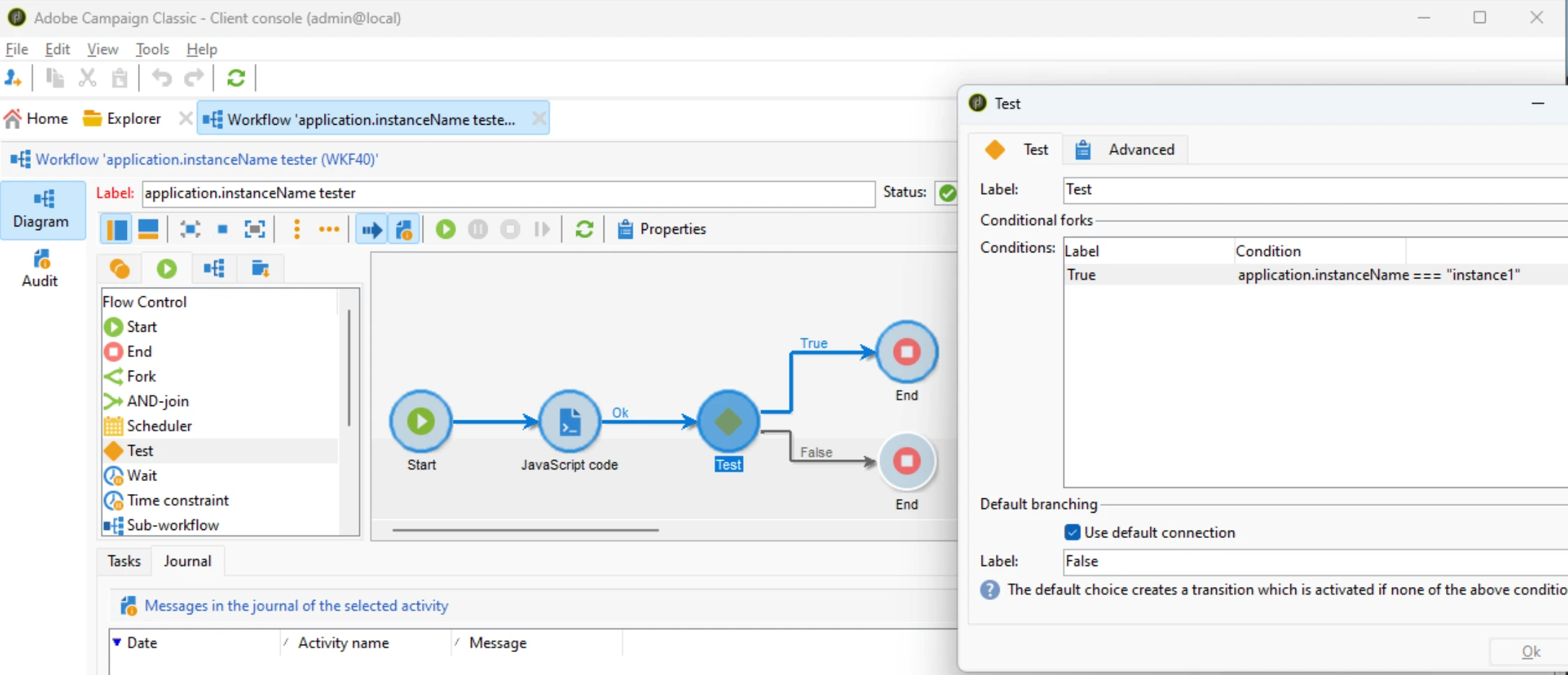
You may also use it in a Test activity in a workflow:
Unit tests
Tested with acc by running
acc instance exec -f test/integration/instanceName.spec.js in a sandbox:
loadLibrary("/nl/core/shared/nl.js"); // import NL.assert
context.test1 = NL.assert(typeof application.instanceName === "string");
context.test2 = NL.assert(application.instanceName.length > 0);
See also
-
📕 instanceVarDir- The absolute path to the instance VAR folder, as a read-only string. -
📕 instanceUploadDir- The absolute path to the instance upload folder, as a read-only string.