
Adobe Campaign Classic has an N-tier architecture called by many sources (client console, recipients emails, web apps..) that follow the same path: load balancer → web server (Apache/IIS) → Tomcat (Java JSP) → nlserver (C++, JavaScript, JSSP) → database.
Knowing that path is the quickest way to tell where to look when something breaks, this article maps the 4 tiers to their public URLs and the configuration files each one resolves to.
Production setups usually follow the stack Recipients > Load Balancer > Tomcat/nlserver/JS > PostgreSQL:
PRESENTATION     ─▶ FRONT                   ─▶ APPLICATION                  ─▶ PERSISTENCE

Recipients     ─┐
Client Console ─┼─▶ Load Balancer > Web     ─▶ Application                  ─▶ Database
SOAP APIs      ─┤   :443            Apache      Linux Tomcat:8080               PostgreSQL
Web Portal     ─┤                   IIS         nlserver                        MS SQL
Web Apps       ─┤                               ├─ wfserver stat inMail         Oracle
JSSP           ─┘                               └─ mta > SMTP > Recipients
While local setups usually follow the simple stack Local > Tomcat/nlserver/JS > PostgreSQL (no front!):
PRESENTATION                                ─▶ APPLICATION                  ─▶ PERSISTENCE
Local computer                              ─▶ Windows Tomcat:8080          ─▶ Windows PostgreSQL
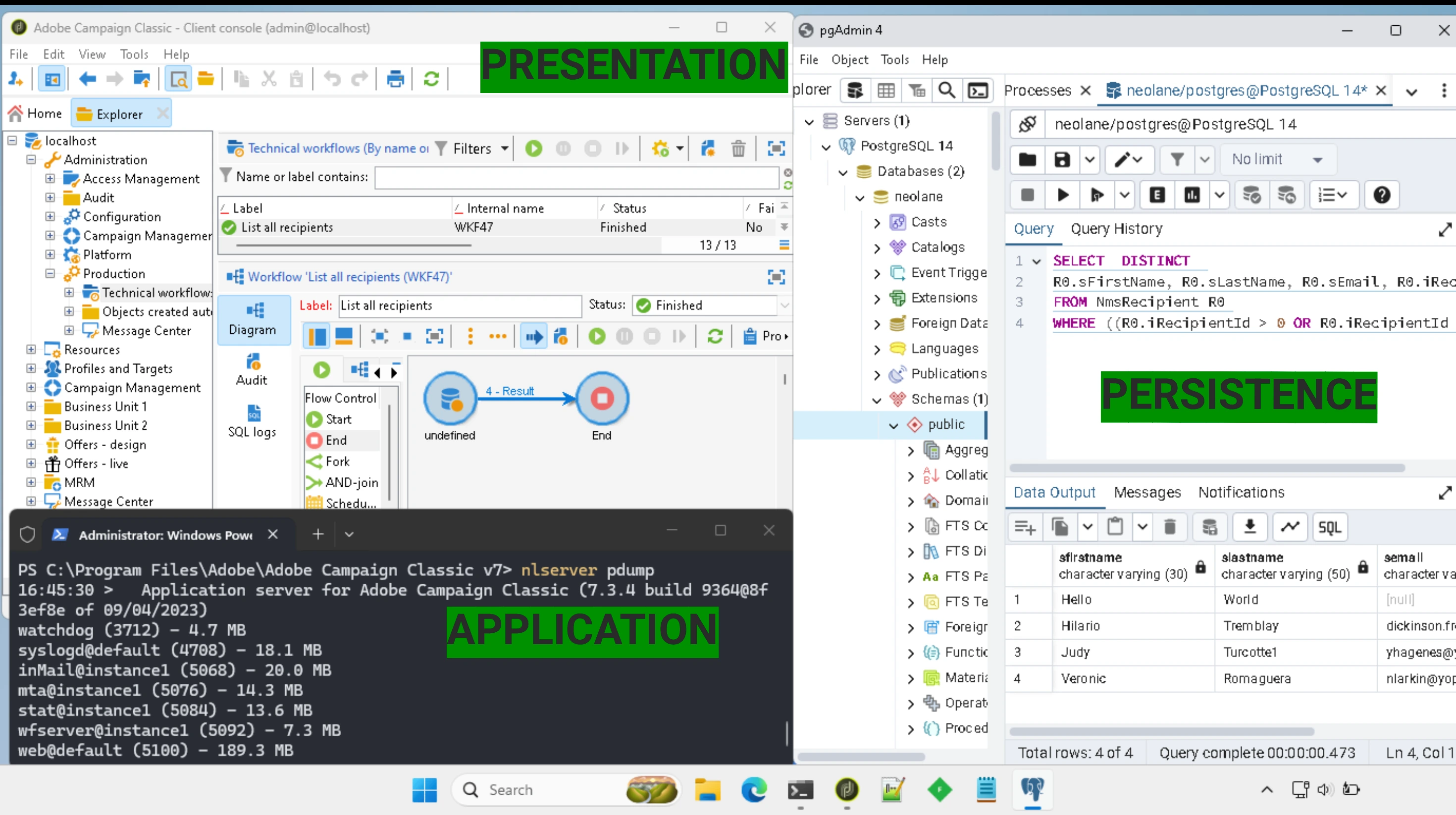
Need to install a local instance? Read How to install AC on Windows. Want to explore the JS engine? Follow the JS Environments
Presentation layer
The presentation layer is everything that publicly connects to Adobe Campaign:
- The emails received by recipients displayed in a mirror page, and the redirection links
- The web apps browsed by recipients
- The administrators access to the Web Portal and the Client Console
- The APIs via SOAP or custom JSSP
Common Application Server URLs
Production servers are usually hosted at https://instance-mkt-prod1.campaign.adobe.com and local at http://localhost:8080:
| Public URL | Description |
|---|---|
/view/home |
Homepage of the Adobe Campaign Web Portal. Redirects to logon if not authenticated. |
/nl/jsp/logon.jsp |
Logon page, redirects to Client Console download page at completion page |
/nl/jsp/install.jsp |
Client Console download page |
/webApp/{internalName} |
Web Apps, see the Web Apps Tutorial |
/{namespace}/{name}.jssp |
JSSP pages, see the 📕 JSSP Reference or the JSSP Tutorial
|
/nl/jsp/soaprouter.jsp |
SOAP APIs for Client console and SOAP web services |
/nl/jsp/m.jsp |
Mirror page |
Default URL Mappings
Adobe Campaign maps URLs to local installation directories for serving static resources (images, JSP, XSL). Here’s a summary of the most common mappings:
| Public URL | Description | Install directory |
|---|---|---|
/nl/*,i.e. /nl/webForms/defaultWebApp.css
|
Static web resources | /web/* |
/*/img/*,i.e. /nms/img/nms-logo-01.png
|
Datakit images for Neolane Marketing Server (NMS) | /datakit/*/eng/img/* |
/*/xsl/* |
Datakit XSL | /datakit/*/eng/xsl/* |
/*/jsp/* |
JSP exposition | /datakit/*/eng/jsp/* |
/res/* |
Resources | /var/res/* |
/cus/* |
Other | ../customers/* |
Front layer
The front layer is built for performance, security and scale with 2 sub-layers:
- Load balancer to distribute the calls between containers, managed by Adobe
- Web server to serve static files and proxy dynamic requests to Tomcat (Apache or IIS on port 443)
It is optional for local development, where calls hit Tomcat on port 8080 directly.
Health check - Front
-
/r/test-> test page, returns XML<redir status='OK' localHost='' .../>
Resource Server (CDN)
Adobe Campaign uses a resource server (CDN) to serve public resources, such as images and files uploaded via the client console. Example URLs:
-
/res/<instanceName>/-> Public resource files
Application layer
The application layer is the core of Adobe Campaign, split into 3 sub-layers:
- Tomcat to handle authentication (session, cookies) and serve high-performances pages (JSP), called by port 8080
- The C++ binary
nlserverto run core business logic & database access, called by Tomcat (via JNI) - The SpiderMonkey JavaScript engine for custom developments, called by nlserver
Health check: Application
-
/nl/jsp/ping.jsp-> ping
Installation directory
Adobe Campaign server can be installed on Linux (nlserver) and Windows (nlserver.exe). To verify its installation directory on Linux, run:
$ cat /etc/passwd | grep neolane
# neolane:x:1001:1001::/usr/local/neolane:/bin/bash
$ echo $DIR_NEOLANE
# /usr/local/neolane/nl6
And on Windows:
PS> Get-Service nlserver6
# Running  nlserver6          Adobe Campaign - Application Server...
PS> sc.exe qc nlserver6
# SERVICE_NAME: nlserver6
#        BINARY_PATH_NAME   : "C:\Program Files\Adobe\Adobe Campaign Classic v7\bin\nlserver" watchdog -svc -noconsole
Cross-platform
Most of an Adobe Campaign install is OS-agnostic: the server configuration, the Tomcat container, the Java libraries, and the JavaScript engine are identical on Linux and Windows. Every path is resolved through the $(XTK_INSTALL_DIR) template that nlserver initiates.
Only a small integration layer is OS-specific:
- the main startup (Linux
env.sh+lib/*.sovs Windowsbin\*.dll) - the web stack (Apache
apache_neolane.confvs IISiis_neolane_setup.vbs) - the monitoring script (
indicators.shvsindicators.vbs)
        LINUX host                     WINDOWS host          ┐
   ────────────────────          ─────────────────────       │  OS-specific
   lib/*.so + env.sh             bin/*.dll                   │  integration
   Apache: apache_neolane.conf   IIS: iis_neolane_setup.vbs  ┘
            │                             │
            └──────────────┬──────────────┘
                           ▼
   ┌─────────────────────────────────────────────┐           ┐
   │   conf/  java/  tomcat/  logs/  var/        │           │ Cross-platform
   │   datakit:  *.js   *.jsp                    │           │ JVM + SpiderMonkey
   └─────────────────────────────────────────────┘           ┘
Installation subdirectories
Adobe Campaign’s installation directory contains several key subdirectories:
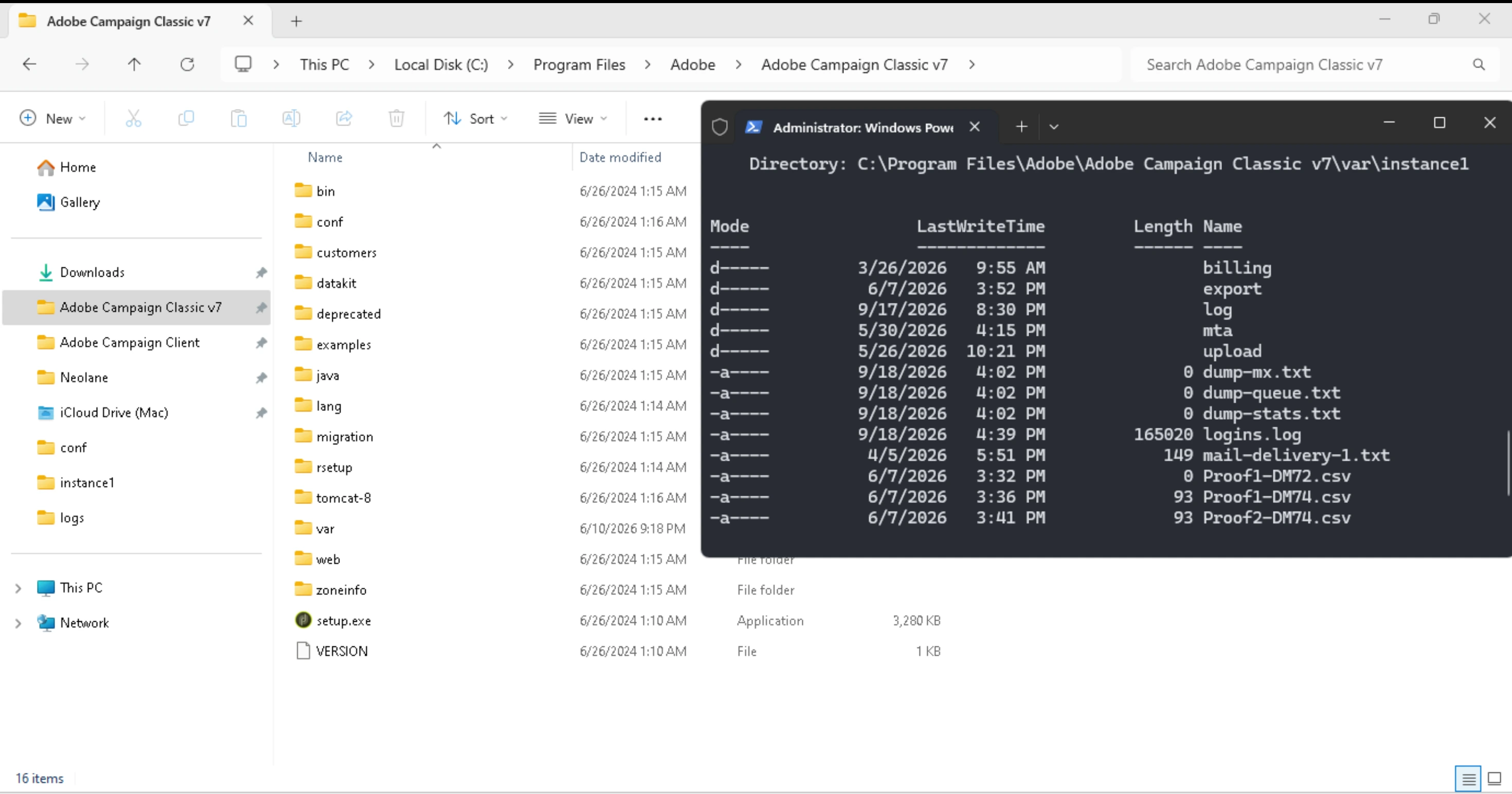
$(XTK_INSTALL_DIR)
├── bin/            # Server binary (nlserver), spamcheck.pl, phantomjs, tools/traceview.exe, htmlToPdf
├── conf/           # Configuration files
    └── serverConf.xml config-default.xml config-<instanceName>.xml
├── customers/      # Customer-specific configurations
├── datakit/        # Core application data and resources
├── deprecated/     # Legacy files (v6.0)
├── examples/       # Sample files and templates
├── java/           # Java libraries
├── lang/           # Language packs
├── migration/      # Migration scripts
├── rsetup/         # Setup and deployment scripts
├── tomcat-7/       # Tomcat server files
    └── conf/       # i.e. apache_neolane.conf server.xml
├── web/            # Web application files
├── zoneinfo/       # Timezone data
├── logs/           # Server logs, i.e. Tomcat catalina.YYYY-MM-DD.log
└── var/            # Runtime and workflow data
    ├── res/        # Instance-specific resources
    │   └── <instanceName>/
    └── <instanceName>/  # Instance-specific directories
        ├── billing/
        ├── export/
        ├── incoming/
        ├── log/    # Instance logs, i.e. inMail.log mta.log runwf.log stat.log wfserver.log
        ├── mta/
        ├── postupgrade/
        ├── redir/
        ├── upload/
        ├── workflow/  # Workflow execution files
        │   └── wf-<internalName>/
        │       └── httpTransfer/
        │           └── xxx.xml
        └── logins.log
Adobe Campaign Namespaces
In Adobe Campaign, namespaces are prefixes used to organize schemas, tables, and APIs. They help avoid naming conflicts and logically group related functionalities. Below are the core namespaces and their purposes.
NMS: Neolane Marketing Server
Covers marketing-related schemas and tables, such as:
-
Recipients (
nms:recipient): The main table for storing customer profiles. -
Deliveries (
nms:delivery): Tables for email, SMS, and other campaign deliveries. -
Campaigns (
nms:operation): Tables for managing marketing campaigns. -
Lists (
nms:group): Tables for managing recipient groups. -
Templates (
nms:template): Templates for deliveries and campaigns.
XTK: eXtended ToolKit
Covers low-level operations, technical and system-level functionalities, such as:
-
Workflows (
xtk:workflow): Workflow schemas and execution. -
JavaScript APIs (
xtk:javascript): Server-side JavaScript APIs. -
Session management (
xtk:session): Authentication and session handling. -
Data schemas (
xtk:srcSchema): Base schemas for extending data models.
CRM: Customer Relationship Management
CRM connector functionalities, such as integrating with external CRM systems (e.g., Salesforce, Microsoft Dynamics):
-
CRM connectors (
crm:connector): Configuration for CRM integrations. -
Synchronization (
crm:sync): Data synchronization between Adobe Campaign and CRM systems.
Persistence layer
The persistence layer is the relational database (PostgreSQL, Oracle or Microsoft SQL Server) holding all recipient, delivery and campaign data. Adobe Campaign never exposes it directly: the native nlserver engine owns every connection and translates the XML queryDef built in server-side JavaScript into SQL. How schemas map to physical tables is detailed in the 📕 Database reference.
Notes on Client Console
The Client Console is part of the presentation layer and can be downloaded from the Adobe Experience Cloud Download Center. It is then started with nlclient.exe (Windows only). It is used by business users to send campaigns (via workflows) and admins to configure the instance (via the built-in IDE). Details:
- Can be installed anywhere but default to
C:\Program Files\Adobe\Adobe Campaign Client. Installing in Program Files require Administrator rights. To avoid Administrator rights requirement, install it in your User folderC:\Users\<user>\Adobe\Adobe Campaign Client - Stores configuration and cache in
C:\Users\<user>\AppData\Roaming\Neolane\NL_6. Access the folder via shortcut%AppData%
%AppData%\Neolane\NL_6
 └─ nlclient\                             # stores cache for each instance in cache-en[instanceid]/
    ├─ nlclient_cnx.xml                   # stores credentials to instances in <connections> with default <cnx id="1" label="localhost" url="http://localhost:8080"/>
    └─ nlclient-config-[instanceid].xml   # stores instance-specific settings, such as <lastPosition>, <urlViewer> and schema <nmsRecipient>, <xtk_queryDef>
- SOAP calls to the instance (request + response) can be debugged by starting the Traceview module: Shift F3 in the Client Console (status bar will show “Traces ON”). Not working? Use Fiddler to debug SOAP requests/responses without Traceview
- Passwords and UI state (columns size, last searches) are saved in the Windows registry under
HKEY_CURRENT_USER\Software\Neolane\NL_5and can be debugged with:
Get-ChildItem "HKCU:\Software\Neolane\NL_5\nlclients" | Select-Object Name
Get-ChildItem "HKCU:\Software\Neolane\NL_5\XtkLogon" | Select-Object Name
Get-ChildItem -Recurse "HKCU:\Software\Neolane\NL_5\nlclient"
- the built-in IDE can be configured with
bin/editor.cfgsuch as-
showlinesno=1to show the line number -
guides=76for the max characters per line -
keywords JAVASCRIPT = break else new var case finally return void catch for switch while continue function this with default if throw delete in try do instanceof typeoffor the reserved keywords - Default colors sample:
-
const labels = ["Hello", "world"];
labels.forEach(function(l){
    logInfo(l); // comment here
});
Sources
- Adobe Campaign - General Architecture
- Azure - N-tier architecture
- Adobe Campaign - INS_Installing_Campaign_in_Linux__Integration_into_a_Web_server
- Adobe Campaign - Troubleshoot load balancer
- Adobe Campaign - Monitoring processes
- Adobe Campaign - Configuring Campaign Server
- Adobe Campaign SDK - Health
Going further
As most of the Adobe Campaign customizations are done in the JavaScript runtime, visit the 📕 JS Environments.