
acc goal is to provide modern experience to manage and develop apps on the Adobe Campaign Classic platform across their entire lifecycle, following the industry best practices by Adobe (aio), Salesforce (sf) and Shopify (shopify).
Infrastructure
acc is a NodeJS utility that connects straight from your local computer to your instance, no middleware.
This helper is meant to be used from your Windows workstation, the same that is using Adobe Campaign Classic Client Console. It is also compatible with MacOS and Linux.
It is based on the Adobe Campaign SDK Architecture (@adobe/acc-js-sdk) that is designed to be simple, small and ready to go. Like the SDK, acc does not depend on any piece of infrastructure, and is designed to be able to connect to any Campaign Classic server.
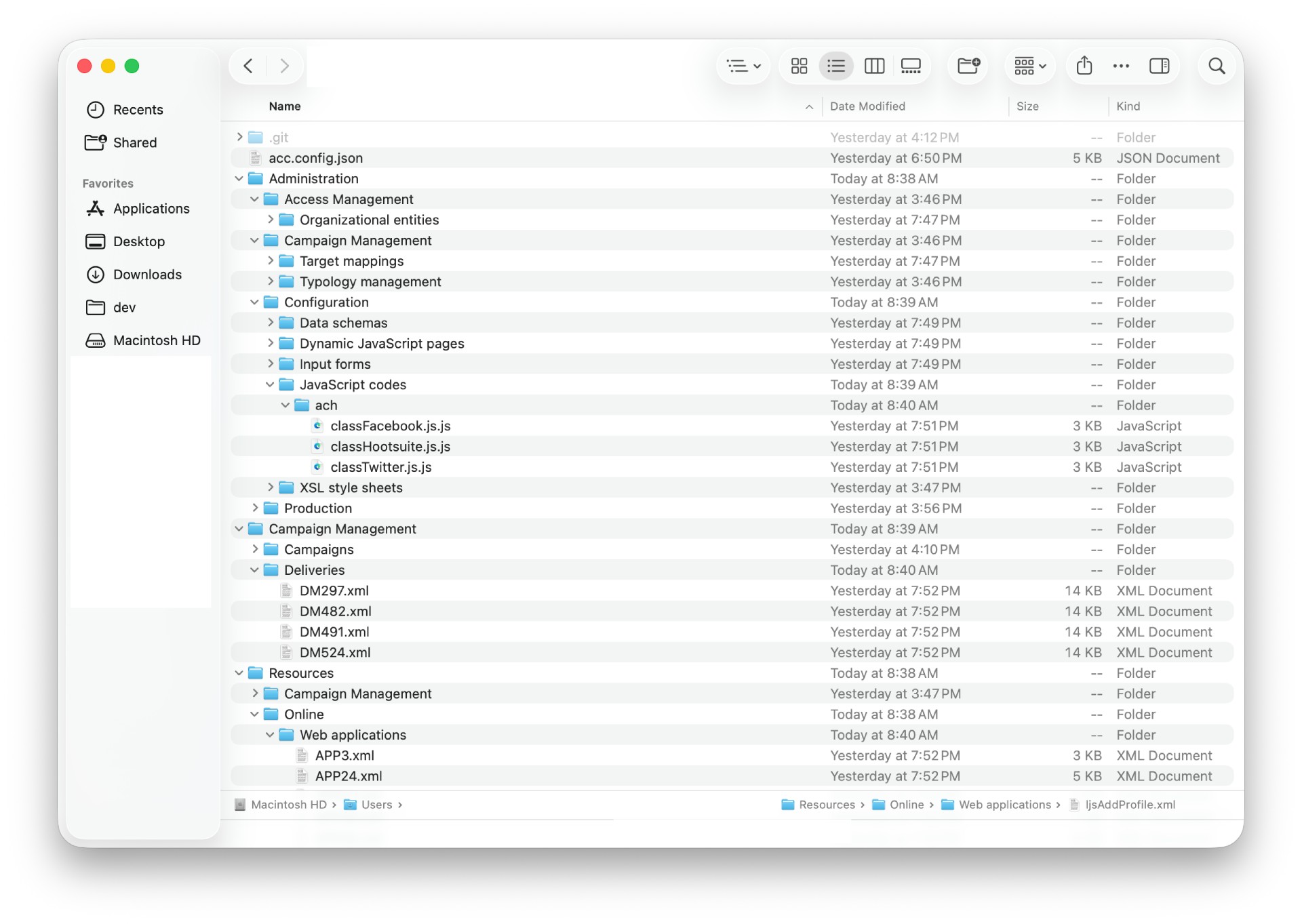
Integration to the Adobe ecosystem
acc uses Adobe I/O cli core libraries for a strong integration within the Adobe ecosystem:
-
@adobe/aio-lib-core-config to store the authentication configuration in the global file
~/.config/aio(in clear text, see Security) -
@adobe/aio-lib-core-logging to log messages to the console, from verbose to errors. Set the level with
$env:AIO_LOG_LEVEL="verbose"on Windows,AIO_LOG_LEVEL=verboseon Unix, andexport AIO_LOG_LEVEL=verboseon zsh. - @adobe/aio-lib-core-errors to surface & identify errors. See Troubleshooting
Logs are also saved in rotating
acc.logfiles, see Logs
Distribution
acc is published to npm as campaign-cli. It follows Semantic Versioning and Conventional Commits.
API Lifecycle
acc instance pull first calls the Adobe Campaign SDK to login and get an authenticated client:
ConnectionParameters.ofUserAndPassword()   # method UserPassword
ConnectionParameters.ofImsBearerToken()    # methods ImsBearerToken and ImsServerToServer
      ↓
sdk.init(connectionParameters)
      ↓
client.logon()
      ↓
client.getSessionInfo()
Then, the second set of calls for the actual queries:
for each schema in config     # loop through each config
      ↓
      do                      # pagination via queryDef.lineCount
                  ↓
            client.NLWS.xml.xtkQueryDef.create()
                  ↓
            query.selectAll(false)
                  ↓
            query.executeQuery()
                  ↓
            for each record in records
                        ↓
                  prepare XML
                        ↓
                  save files
      ...while records
Mirrors the Adobe Campaign Client Console lifecycle
With ImsServerToServer, acc first generates an IMS access token from the stored Developer Console credentials, and reuses it before it expires (usually 24 hours).
CLI Lifecycle
acc is started from the terminal, relies on oclif to handle the basic routing, and is extended with native Adobe I/O plugins:
-
acc auth-
init,login,list,ip,decode
-
-
acc instance-
check,pull,template,exec,info,queryDef,soap,watch
-
-
acc monitortest
-
acc config(from@adobe/aio-cli-plugin-config)-
list(aliasls),get,set,delete(aliasesdel,rm),clear,edit
-
acc infoacc report
Auth command group
The auth command group manages ACC instance configurations and authentication:
| Command | Purpose | Options | Based on |
|---|---|---|---|
| auth init | Initialize new instance configuration, then log in | All optional, missing values are prompted on an interactive terminal: –alias, –host, –method (UserPassword, ImsBearerToken, ImsServerToServer), –user, –pass, –token, –json-file (server-to-server), –ims-env | aio-cli-plugin-config.set |
| auth login | Authenticate to configured instance | –alias (required) | acc-js-sdk.ConnectionParameters |
| auth list | List all configured instances | –json | aio-cli-plugin-config.get |
| auth ip | Display current public IP address | None | acc-js-sdk.ip |
| auth decode | Decode an IMS access token, without verifying its signature | TOKEN (argument), –json | Local decoding of the JWT header and payload |
Instance command group
The instance command group performs data operations on authenticated instances. All of them, except template, accept:
-
--alias: optional whenacc.config.jsonhas analiaskey -
--path: defaults to the current directory -
--config: defaults to./acc.config.json
| Command | Purpose | Specific options | Based on |
|---|---|---|---|
| instance check | Dry run: run the pull queries without writing any file |
–metadata | xtk:queryDef#ExecuteQuery |
| instance pull | Download ACC data to local files | –metadata | Same as check, and creates files |
| instance template | Displays the default configuration | None | Reads the default acc.config.json
|
| instance exec | Execute server-side JavaScript | –file or –script, | xtk:builder#EvaluateJavaScript |
| instance info | Diagnostic report of the instance | None |
xtk:session#TestCnx, #GetServerTime, #GetCnxInfo, nl:monitoring#DumpCurrentInstanceState
|
| instance queryDef | Run a query defined as XML or JSON | –query or –file, –json | xtk:queryDef#ExecuteQuery |
| instance soap | Call any static SOAP method | –schema, –method, –args, –json | SOAP calls |
| instance watch | Push edited decomposed files to the instance (early access) | –debounce | xtk:session#Write |
instance watchis in early access: test it on a sandbox first. It only pushes text values, and skips XML elements that have child elements.
The monitor command group is anonymous: monitor test probes the /r/test endpoint of the instance, with --host or --alias (exclusive).
Cache & logs
acc caches data in the oclif cache folder:
%LOCALAPPDATA%/campaign-cli   # Windows
~/Library/Caches/campaign-cli # MacOS
~/.cache/campaign-cli         # Linux
Cache
For performance, acc uses the acc-js-sdk cache that stores Adobe Campaign SOAP methods such as MethodCache$xtk:queryDef#BuildQuery and MethodCache$xtk:queryDef#ExecuteQuery.
They are unique by alias (as subfolders) and SDK version (as filename):
local/
      acc.js.sdk.1.2.1.localhost%3A8080.cache.MethodCache%24xtk%3AqueryDef%23BuildQuery.json
staging/
      acc.js.sdk.1.2.1.localhost%3A8080.cache.MethodCache%24xtk%3AqueryDef%23BuildQuery.json
Cache filenames are sanitized with
encodeURIComponent:localhost:8080becomeslocalhost%3A8080,$is%24…
Cache can be disabled via
acc.config.json. See Reference
Logs
For traceability, acc logs console outputs in rotating acc.log files (5 * 1MB). The file captures every level, whatever AIO_LOG_LEVEL is set to for the console. Sample of acc.log:
2026-06-08T20:52:04.110Z [acc] info: 📰 Writing logs to /Users/demo/Library/Caches/campaign-cli
2026-06-08T20:52:04.131Z [acc] info: 🛠️ Using config acc.config.json
2026-06-08T20:52:04.133Z [acc] info: 🔑 Reading authentication from /Users/demo/.config/aio
2026-06-08T20:52:04.133Z [acc] info: ↔️ Connecting admin@http://localhost:8080/...
2026-06-08T20:52:04.133Z [acc] verbose: Using sdkOptions {"traceAPICalls":false}
2026-06-08T20:52:04.133Z [acc] verbose: Using AccCache for SDK storage
2026-06-08T20:52:04.175Z [acc] verbose: SOAP-Request⏫ xtk:session#Logon <SOAP-ENV:Envelope>...</SOAP-ENV:Envelope>
2026-06-08T20:52:04.753Z [acc] verbose: SOAP-Response⤵️ xtk:session#Logon <SOAP-ENV:Envelope …[+2116 chars]
2026-06-08T20:52:04.756Z [acc] info: ✅ Logged in to instance1 (7.3.4 build ---) successfully.
2026-06-08T20:52:04.757Z [acc] info: ✨ Pulling data to /Users/demo/backup-acc-localhost
2026-06-08T20:52:04.785Z [acc] verbose: Querying instance for records from 0 to 19...
2026-06-08T20:52:04.796Z [acc] verbose: SOAP-Request⏫ xtk:persist#GetEntityIfMoreRecent <SOAP-ENV:Envelope...</SOAP-ENV:Envelope>
2026-06-08T20:52:05.753Z [acc] verbose: SOAP-Response⤵️ xtk:persist#GetEntityIfMoreRecent SOAP-ENV:Envelope…[+22019 chars]
Security
- Credentials are stored in clear text by
@adobe/aio-lib-core-config, in the global aio file (~/.config/aio, or the path inAIO_CONFIG_FILE), like the otheraioCLIs. It is outside of version controlled folders, but not encrypted. It holds passwords, pasted tokens, Server-to-Server client secrets and the generated IMS access tokens: treat this file as the credentials of your instances, on a per-user account with restrictive file permissions. - Logs & Cache are stored using
oclif(outside of version controlled folders) - All network communications use the Adobe Campaign SDK Protocol and Adobe Campaign SDK SOAP API
- Secrets are removed from the SOAP traces by the official ACC JS SDK via the Adobe Campaign SDK Utils. This does not cover everything else written to
acc.logat theverboselevel: thesdkOptions(includingextraHttpHeadersfromacc.config.json) and the full results ofinstance exec,queryDef,soapandinfo. Pulled files are not redacted either. Keepacc.log, the cache and pulled sources out of public repositories, and setACC_NO_FILE_LOG=1to disable the log file.