JavaScript in Adobe Campaign workflows is powerful but hard to maintain without tooling. This reference covers the patterns used most in production: personalization, data access, data quality, and automation utilities.
Adobe Campaign exposes a JavaScript runtime directly inside workflows, JavaScript codes (xtk:javascript), and JSSP pages. It gives developers full access to the AC data model, SOAP APIs, SQL, and HTTP. This page is a curated reference of the patterns that come up most in production. Each snippet is ready to copy into a JavaScript Code activity or a xtk:javascript library.
💡 Pro tip: Use acc to pull your JavaScript codes as local .js files — editable in VS Code, formattable with prettier, trackable in Git.
Personalization
HTML if/else by gender
<td>
  <% if(recipient.gender == 1){ %>
  <!-- Female -->
  <% } else if(recipient.gender == 2){ %>
  <!-- Male -->
  <% } else { %>
  <!-- Unspecified -->
  <% } %>
</td>
XTK Case/When (in queryDef expressions)
Case(
  When([target/@nature] = 'transactional', [target/@created]),
  When([target/scheduling/@extracted] != '', [target/scheduling/@extracted]),
  When([target/scheduling/@contactDate] != '', [target/scheduling/@contactDate]),
  Else('')
)
Data Access
Change a Continuous Delivery’s template via JavaScript (queryDef)
To update a delivery after sending.
var month = formatDate(getCurrentDate(), "%2M"); // 01, 02, 03...
var internalName = "myInternalName_" + month;
var query = NLWS.xtkQueryDef.create({
  queryDef: {
    schema: "nms:delivery",
    operation: "get", // "get" does a SQL "LIMIT 1"
    select: { node: [{ expr: "@id" }] }, // get @id only
    where: {
      condition: [{ expr: "@internalName = '" + internalName + "'" }],
    },
  },
});
var deliveryTemplate = query.ExecuteQuery();
logInfo("activity.scenario_id:", deliveryTemplate.$id);
activity.scenario_id = deliveryTemplate.$id;
Query records from a workflow transition (vars.targetSchema)
For pre-processing and post-processing.
var query = NLWS.xtkQueryDef.create({
  queryDef: {
    schema: vars.targetSchema,
    operation: "select",
    lineCount: 999999999, // /!\ lineCount defaults to 10,000
    select: { node: [{ expr: "@id" }, { expr: "@email" }] },
  },
});
var records = query.ExecuteQuery(); // DOMElement

records.getElements().forEach(function (record) {
  logInfo(record.$id);
  var cleanedEmail = record.$email.replace(/\s+/g, "").toLowerCase();
  sqlExec(
    "UPDATE " + vars.tableName + " SET sEmail=$(sz) WHERE iId=$(l)",
    cleanedEmail,
    record.$id
  );
});
.forEach() syntax instead of for each(). More in the AC JavaScript best practices article.
Read and parse an XML file (DOMDocument.load)
var xmlDoc = DOMDocument.load(vars.filename);
var entries = xmlDoc.getElementsByTagName("entry");
logInfo(entries.length);
entries.forEach(function (entry) {
  logInfo(entry.getValue("g:image_link"));
  var sql = "INSERT INTO " + vars.tableName + " (iId, sProductId) VALUES ($(id), 'a')";
  var recCount = sqlExec(sql);
  logInfo("(" + recCount + ")", sql);
});
Read a memo field as XML
try {
  var mData = sqlGetMemo('SELECT mData FROM nmsDelivery WHERE iDeliveryId = $(l)', record.$id); // get memo from DB, @return string
} catch (error) {
  continue;
}
var doc = DOMDocument.fromXMLString(mData); // convert to DOMDocument
var subject = doc.root.getValue('mailParameters/subject'); // root is a DOMElement and getValue @return string
var cleanedSubject = subject;
cleanedSubject = cleanedSubject.replace(/(\r\n)/gm, ''); // remove line breaks
Audit Trail
Add @created, @lastModified, @createdBy-id, @modifiedBy-id to any schema — automatically maintained by the Update data activity.
Best practice: use on tables with fewer than 10,000 records.
Schema (XML)
<element aggregate="xtk:common:auditTrail" name="auditTrail"/>
Data migration (JS)
var tables = ["customAbc", "customDef"];
tables.forEach(function (table) {
  var sql = "UPDATE " + table + " SET tsLastModified=oldField, tsCreated=oldField";
  logInfo(sql);
  var count = sqlExec(sql);
  logInfo("> " + count + " records updated");
});
Data Quality (DQM)
With XTK expression
var xtkFields = ["@email", "@mobilePhone", "@phone", "@firstName", "@lastName", "@middleName"];
xtkFields = xtkFields.map(function (x) {
  return "COALESCE(" + x + ", '')";
}); // [COALESCE(@email, ''), COALESCE(@firstName, '')...]
xtkFields = xtkFields.join("+"); // "COALESCE(@email, '')+COALESCE(@firstName, '')...]"
var query = NLWS.xtkQueryDef.create({
  queryDef: {
    schema: "nms:recipient",
    operation: "select",
    lineCount: 999999999, // /!\ lineCount defaults to 10,000
    select: { node: [{ expr: "@id" }, { expr: xtkFields, alias: "@text" }] },
    where: {
      condition: [
        { expr: xtkFields + " LIKE '%<%'", boolOperator: "OR" }, // look for <
        { expr: xtkFields + " LIKE '%>%'", boolOperator: "OR" }, // look for >
        { expr: xtkFields + " LIKE '%&%'", boolOperator: "OR" }, // look for &
      ],
    },
  },
});
var records = query.ExecuteQuery(); // DOMElement
records.getElements().forEach(function (record) {
  logInfo(record.$id, record.$text);
});
With SQL expression
var sqlFields = ["sEmail", "sMobilePhone", "sPhone", "sFirstName", "sLastName", "sMiddleName"];
var sql =
  "SELECT iRecipientId FROM NmsRecipient WHERE " +
  "CONCAT(" +
  sqlFields.join(",") +
  ") LIKE '%<%' OR " +
  "CONCAT(" +
  sqlFields.join(",") +
  ") LIKE '%>%' OR " +
  "CONCAT(" +
  sqlFields.join(",") +
  ") LIKE '%&%' ";
var document = sqlSelect("document,@id:long", sql);
logInfo(document); // <select> <document id="XXX"/> </select>
Utilities
Dates
formatDate(getCurrentDate(), '%4Y%2M%2D-%2H%2N%2S'); // "20190430-150837" for folder names

<%= formatDate(getCurrentDate(), '%4Y%2M') %> // "202005" for delivery labels [scenario/@useLabelScript]
Options (read/write)
var month = formatDate(getCurrentDate(), "%2M"); // 01, 02, 03...
var optionName = "myOptionName_" + month;
logInfo("Getting option:", optionName);
var optionValue = getOption(optionName);
setOption("otherOption", optionValue);
JSON
var myObject = { name: "Example Object", value: 123 };
logInfo(JSON.stringify(myObject, null, 2)); // Use null and 2 for pretty printing
vars with array
vars.markets = ["GB", "FR"]; // stored as comma-separated string
vars.market = vars.markets.split(",")[0]; // retrieved
Create a temporary Linux file
vars.filename = execCommand("mktemp")[1] + "-" + formatDate(new Date(), "%4Y-%2M-%2D") + "-ac7.csv";
Import a JavaScript library
loadLibrary("namespace:name");
npm library, follow the import JavaScript library article.
JS: Asynchronous HTTP calls
For non-blocking API calls inside a workflow with the 📕 execute method of HttpClientRequest.
Full details: Async API calls in Adobe Campaign.
// required variables: records, endpoint

var requests = []; // use to store all HttpClientRequest for "HttpClientRequest.wait(requests)"

var onComplete = function (request, context, status) {
  // do your things
  sendNext(context);
};

function sendNext(context) {
  while (records.length != 0) {
    // while list is not empty
    var record = records.shift(); // take and remove first record
    var req = new HttpClientRequest(endpoint);
    req.complete = onComplete;
    try {
      var async = true;
      req.execute(false, async, context, 2 * 1000);
      requests.push(req);
      return; // important
    } catch (error) {
      logWarning("Error while getting response, continue. Error:", error);
      continue; // continue because not called by onComplete
    }
  }
}

// Start N requests with context as a JSON
sendNext({ id: 1 });
sendNext({ id: 2 });

// Wait until all requests are completed
HttpClientRequest.wait(requests);
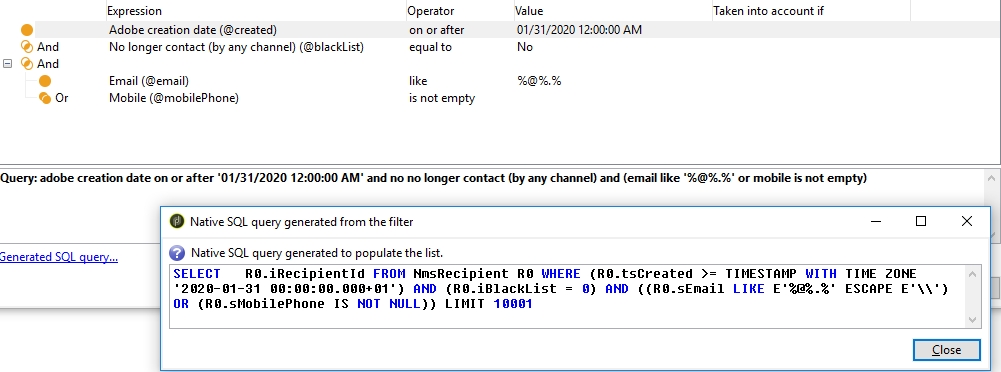
UI: Predefined Filter Syntax
0|@created|#2020-01-30 23:00:00.000Z#|>=|||||0|/|0
0|@blackList|0|=|AND||||0|/|0
0||||AND||||1|/|0
0|@email|'%@%.%'|LIKE|||||0|/|1
0|@mobilePhone||IS NOT NULL|OR||||0|/|1