
Adobe Campaign developments lack the traceability, safety, and quality used by the marketing industry like Salesforce or Shopify. Changes are made directly in the Client Console, with no trace of what was modified, no recovery procedure, and no development process.
Adopt modern development practices for Adobe Campaign: JS coding standards, automated tooling, and DevOps processes ; to reduce operational risk, accelerate delivery while maintaining quality, and support any migration: v7 to v8, build upgrades… As context, the AC engine has known limitations:
| AC Runtime is old and fragile | Poor Quality process | No validation |
|---|---|---|
JavaScript ES5 engine from 2009, monolithic scripts, undocumented functions e.g. logError throws silently |
No standards, limited traceability via audit, manual rollbacks via packages | No unit tests, no quality checks before production, no coverage, no regression detection |
Coding Best Practices
Adobe Campaign Classic embeds a JavaScript ES5 engine from 2009. It supports the proprietary syntax E4X, that was removed from all modern browsers and runtimes in 2014. Writing code with E4X creates scripts that cannot be read, validated, or tested outside of the AC console. 5 Standards eliminate this dependency:
-
S1: Query with JSON, over E4X:
{queryDef: {schema: "nms:delivery"}}over<queryDef/> -
S2: Handle XML with DOM over E4X:
delivery.$labeloverdelivery.@label -
S3: Iterate with forEach over
for each:deliveries.forEach(function(d))overfor each(var d in deliveries) -
S4: Use JavaScript files imported in JSSP and Workflows with
loadLibrary("ns:name"), over embedded -
S5: Use brackets for native XML when E4X cannot be avoided:
vars["@attr"],instance,activity…
S1: Query JSON over E4X
Use JSON {} with NLWS for any query of 📕 queryDef, not inline XML tags </> with xtk.
// ✅ JSON: portable, lintable, readable
var queryDef = { queryDef: { schema: "nms:delivery", operation: "get" } }; // typeof object, NL.isXML(queryDef) is false
var delivery = NLWS.xtkQueryDef.create(queryDef).ExecuteQuery(); // typeof object, NL.isXML(records) is false

// ❌ E4X: proprietary, unreadable outside AC
var queryDef = <queryDef schema="nms:delivery" operation="get" />; // typeof xml, NL.isXML(queryDef) is true
var delivery = xtk.queryDef.create(queryDef).ExecuteQuery(); // typeof xml, NL.isXML(records) is true
S2: Handle DOM over E4X
Use DOM $ attributes for any XML manipulation, not E4X @. All available methods are in 📕 DOMElement to read nodes, and 📕 DOMDocument to write nodes.
// ✅ DOM: explicit, debuggable, standards-compliant: compatible with prettier and jest
var label = delivery.$label; // recipient.hasAttribute("label") is true

// ❌ E4X: silent failure if node is missing
var label = delivery.@label.toString(); // typeof delivery and delivery.@label is xml
S3: Iterate with forEach
Use .forEach() notation over for each loop that AC introduced and was never part of any JavaScript standard. If used on a 📕 DOMElement, make sure to call getElements() first.
var queryDef = { queryDef: { schema: "nms:delivery", operation: "select" } };
var deliveries = NLWS.xtkQueryDef.create(queryDef).ExecuteQuery();

// ✅ ES5 — supported everywhere: compatible with prettier and jest
deliveries.getElements().forEach(function(delivery) { logInfo(delivery); });

// ❌ Proprietary — not valid ES5, not testable
for each (var delivery in deliveries) { logInfo(delivery); }
S4: Use JS files
JavaScript runs in three different contexts in Adobe Campaign — xtk:javascript files, xtk:jssp pages, and xtk:workflow activities. Each context has different editor support (syntax highlighting and line counts not always available). Business logic scattered across all three is difficult to track, impossible to test, and inconsistently extracted.
xtk:javascript files have the broadest support: syntax highlighting, line counts, full extraction by acc, and compatibility with prettier and jest. All business logic should live there, and be called from JSSP and workflows via loadLibrary.
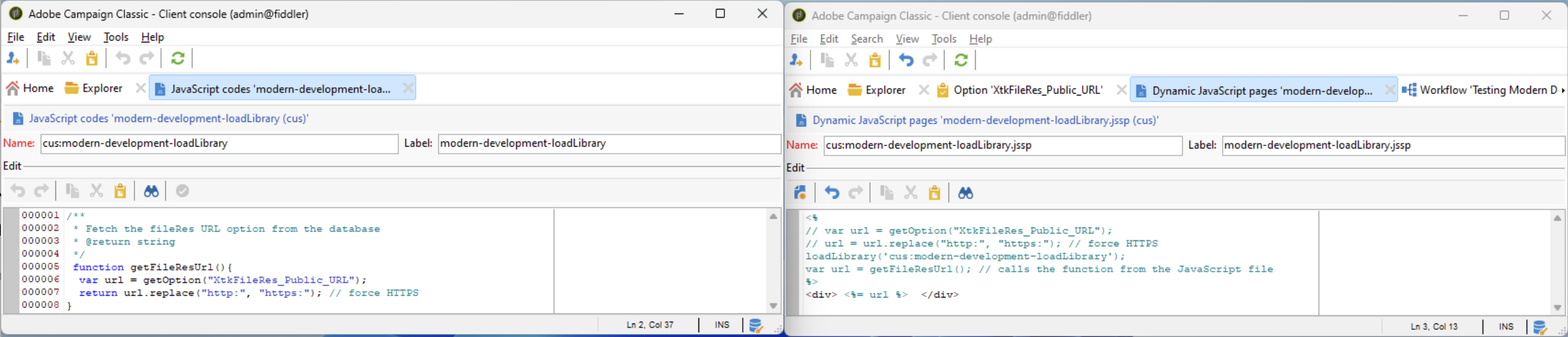
This will allow powerful tools in next chapters: this separation makes each layer independently maintainable: the JavaScript file holds the logic, the JSSP or workflow holds only the call. acc extracts and versions the file. jest tests the function. prettier formats the source.
Note: Internal Name of JavaScript files should not end with .js as it will be automatically suffixed by acc.
S5: Tolerate E4X-safe
When E4X is unavoidable, drop the syntax .@attr, not the xml object. For example, the workflow context (instance, activity, event), the SOAP functions and application.getSchema() hand E4X you can’t migrate. Keep the object, read it with the brackets ["@attr"].
var vars = new XML("<vars><elem attribute1='value1'/></vars>");

var attr1 = vars.elem["@attribute1"].toString(); // "value1"
typeof vars.elem["@attribute1"]; // xml
What this unlocks
Recovery with acc
Run acc instance pull to download your instance as local files — schemas, workflows, JavaScript codes, delivery templates. Refer to Getting started with acc CLI.
Quality Assurance with prettier
Use prettier on the extracted files to enforce consistent code style across your entire instance. Refer to Use cases with acc CLI.
Traceability with git
Pull daily with acc, format with prettier, commit to Git. Every schema change, workflow update, and delivery template modification is tracked, attributed, and reversible. Refer to Improve code traceability with acc CLI.
Quality Control with jest
Use jest to add unit tests and coverage to workflow logic that previously ran untested in production. acc extracts JavaScript codes as standard .js files — compatible with any test runner. Refer to Use cases with acc CLI.
Methodology
The above standards were created with the below work & sources. Each code has been tested on a real instance by executing JavaScript codes with and without the best practices.
- Local instance created with the Windows installation article
- JS codes check the variable type with the native
📕 NL.is. - JS codes were executed at scale with
acc instance exec -f scripts/best-practices.js. Read the Getting started with acc article.
Adobe Campaign uses the deprecated E4X (ECMAScript for XML) language for JavaScript. This language has been abandoned by Mozilla in 2012 with Firefox 10, but is still widely used in Adobe Campaign development. E4X allows several bad practices that break any modern tool (VS Code, Prettier, ESLint…). It introduces deprecated classes in Adobe Campaign JavaScript codes such as the 📕 XML/📕 XMLList classes, the for each loop, and the @ attribute getter.
Quoting the ECMA-357 specification from June 2004, E4X was supposed to be Simple, Consistent, Familiar, Minimal, Loose Coupling and Complementary. But it turned out that JSON was widely supported and extended.
Why S1
Deprecated: Adobe Campaign allows inline XML literals directly in JavaScript. As they are not in quotes, this breaks every tool: VSCode, linters, formatters, and AI assistants will reject it.
ESLint will reject with the error “Parsing error: Unexpected token <”.
Why S2
Deprecated: Adobe Campaign provides a shorthand to traverse XML nodes using @ notation. This notation also breaks every tool.
ESLint will reject with the error “Decorators are not valid here.”.
Why S3
Deprecated: Adobe Campaign provides a shorthand to iterate over XML nodes using for each notation. It is not supported by any linter or test runner. This notation also breaks every tool.
ESLint will reject with the error “Parsing error: Unexpected token each.”.
Why S4
To be extracted as JavaScript files that can be used in VSCode and local build tools: git, prettier, acc…
Why S5
When the technical debt is too big and must be fixed by chunks.