
Curated list of XML code examples for your input form in Adobe Campaign 7 with actual business cases.
For example, a developer needs to create custom input forms in Adobe Campaign 7 and requires examples to guide the implementation.
Preparation
Before diving into the examples, ensure you have access to an Adobe Campaign instance and are familiar with the basic concepts of input forms and XML structures. This guide assumes you have a working knowledge of XML and Adobe Campaign.
Walkthrough
Static

<static type="help" label="Market is used to customize the delivery form by hiding/showing some fields."/><input xpath="@market"/>
Quick summary

<container colcount="5" colspan="3" label="Summary" type="frame">      <container type="visibleGroup" visibleIf="@a!=''">
        <static fontBold="true" img="xtk:xtkcheck.png" label="Email"/>
      </container>
      <container type="visibleGroup" visibleIf="@a=''">
        <static fontBold="true" img="xtk:xtkcancel.png" label="Email"/>
      </container>
      <container type="visibleGroup" visibleIf="@b!=''">
        <static fontBold="true" img="xtk:xtkcheck.png" label="POS id"/>
      </container>
      <container type="visibleGroup" visibleIf="@b=''">
        <static fontBold="true" img="xtk:xtkcancel.png" label="POS id"/>
      </container>
      <container type="visibleGroup" visibleIf="@c!=''">
        <static fontBold="true" img="xtk:xtkcheck.png" label="WEB id"/>
      </container>
      <container type="visibleGroup" visibleIf="@c=''">
        <static fontBold="true" img="xtk:xtkcancel.png" label="WEB id"/>
      </container>
      <container type="visibleGroup" visibleIf="[d/@d]>0">
        <static fontBold="true" img="xtk:xtkcheck.png" label="Loyalty id"/>
      </container>
      <container type="visibleGroup" visibleIf="[d/@d]<1">
        <static fontBold="true" img="xtk:xtkcancel.png" label="Loyalty id"/>
      </container>
      <container type="visibleGroup" visibleIf="@e=1">
        <static fontBold="true" img="xtk:xtkcheck.png" label="Guest"/>
      </container>
      <container type="visibleGroup" visibleIf="@e=0">
        <static fontBold="true" img="xtk:xtkcancel.png" label="Guest"/>
      </container>
    </container>
Select an image
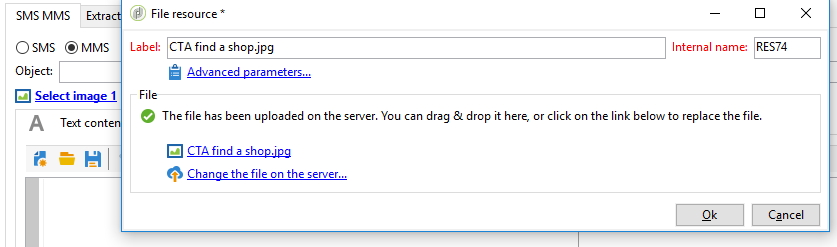
mynms:deliveryExtensions
<!-- Step 1. input with form fields -->
<input fontBold="true" img="nl:sryimage.png" label="Select image 1" type="subFormLink"
xpath="image1">
<form editionMode="dialog" entitySchema="xtk:form" img="xtk:form.png" label="File resource"
name="fileRes" namespace="xtk" xpathsToLoad="@originalName,@fileName,@md5,@contentType,@codepage,@storageType"
xpathsToLoadOpt="@publish" xtkschema="xtk:form">
<enter>
<soapCall name="GetPublicFileResURL" service="xtk:fileRes">
<param type="string" xpathOut="/tmp/@publicFileResUrl"/>
</soapCall>
<if expr="@internalName=''">
<set expr="GetOption('XtkInstancePrefix')+'RES'+CounterValue('xtkResource')"
xpath="@internalName"/>
</if>
</enter>
<container ref="mynms:deliveryExtensions:selectAnImage"/>
<leave>
<set value="xtk:fileRes" xpath="../../ignored/writer/fileRes/@xtkschema"/>
<set value="insert" xpath="../../ignored/writer/fileRes/@_operation"/>
<if expr="@md5 != ''">
<set value="insertOrUpdate" xpath="../../ignored/writer/fileRes/@_operation"/>
</if>
<set expr="[@fileName]" xpath="../../ignored/writer/fileRes/@fileName"/>
<set expr="[@md5]" xpath="../../ignored/writer/fileRes/@md5"/>
<set value="0" xpath="../../ignored/writer/fileRes/@codepage"/>
<set expr="[@originalName]" xpath="../../ignored/writer/fileRes/@originalName"/>
<set expr="[@label]" xpath="../../ignored/writer/fileRes/@label"/>
<set expr="[@internalName]" xpath="../../ignored/writer/fileRes/@internalName"/>
<set expr="[@contentType]" xpath="../../ignored/writer/fileRes/@contentType"/>
<set value="1" xpath="../../ignored/writer/fileRes/@useMd5AsFilename"/>
<!-- set folder -->
<set value="23352281" xpath="../../ignored/writer/fileRes/@folder_id"/>
</leave>
</form>
</input>
<!-- Step 2. Select An Image popup -->
<container colcount="2" img="xtk:properties.png" label="General" name="selectAnImage">
<container colcount="2" colspan="2">
<input xpath="@label"/>
<input xpath="@internalName"/>
<input colspan="2" img="xtk:properties.png" label="Advanced parameters..."
nolabel="true" type="subFormLink" xpath=".">
<form label="Advanced parameters">
<input xpath="@useMd5AsFilename"/>
<static label="This option is used to generate a unique filename using a MD5 hash of the file content."
type="help"/>
</form>
</input>
</container>
<container colspan="2" type="visibleGroup" visibleIf="GetOption('NmsDelivery_ImagePublishing')!='none'">
<container form="xtk:fileResUpload" name="dropZone" prebuildSubForm="false"
type="fileDropZone">
<enter name="onClick">
<set expr="[/tmp/@uploadFile]" xpath="@originalName"/>
<set value="5" xpath="/tmp/@storageType"/>
</enter>
<container label="File" name="actions" type="frame">
<container name="upload" type="visibleGroup" visibleIf="@loaded==false">
<static img="xtk:loginfo.png" label=" " name="helpNotLoaded">The file has not yet been uploaded on the server. You can drag & drop the file here to upload it, or click on the link below.</static>
<input form="xtk:fileResUpload" img="xtk:upload.png" label="Upload file to server..."
modelessExpr="'$(entityPath)'='/fileRes'" needWriteAccess="true"
type="subFormLink" xpath=".">
<enter name="onClick">
<set value="5" xpath="/tmp/@storageType"/>
<set expr="FileDlg(@originalName, 'open')" xpath="/tmp/@uploadFile"/>
<set expr="[/tmp/@uploadFile]" xpath="@originalName"/>
<if expr="'$(entityPath)'='/fileRes'">
<saveView/>
</if>
</enter>
</input>
</container>
<container name="loaded" type="visibleGroup" visibleIf="@loaded">
<static img="xtk:xtkcheck.png" name="helpLoaded" nolabel="true">The file has been uploaded on the server. You can drag & drop it here, or click on the link below to replace the file.</static>
<container name="download">
<input form="xtk:fileResDownload" imgExpr="EImg(@userContentType)"
labelExpr="FileName(@originalName)" modelessExpr="'$(entityPath)'='/fileRes'"
needWriteAccess="true" nolabel="true" type="fileLink" xpath="."/>
</container>
<container name="uploadModify">
<input form="xtk:fileResUpload" img="xtk:upload.png" label="Change the file on the server..."
modelessExpr="'$(entityPath)'='/fileRes'" needWriteAccess="true"
nolabel="true" type="subFormLink" xpath=".">
<enter name="onClick">
<set value="5" xpath="/tmp/@storageType"/>
<set expr="FileDlg(@originalName, 'open')" xpath="/tmp/@uploadFile"/>
<set expr="[/tmp/@uploadFile]" xpath="@originalName"/>
<if expr="'$(entityPath)'='/fileRes'">
<saveView/>
</if>
</enter>
</input>
</container>
</container>
</container>
</container>
</container>
</container>
<!-- Step 3. update fields on leave -->
<leave>
<!-- link image 1 to delivery, if any -->
<if expr="[image1/@fileName] !=''">
<if expr="[/ignored/writer/fileRes/@internalName]!=''">
<soapCall name="Write" service="xtk:persist">
<param exprIn="[/ignored/writer/fileRes]" type="DOMDocument"/>
</soapCall>
</if>
<set value="xtk:fileRes" xpath="/ignored/queryDefFR/@schema"/>
<set value="select" xpath="/ignored/queryDefFR/@operation"/>
<set value="@id" xpath="/ignored/queryDefFR/select/node[1]/@expr"/>
<set expr="'@internalName=\''+[image1/@internalName]+'\''" xpath="/ignored/queryDefFR/where/condition[1]/@expr"/>
<soapCall name="ExecuteQuery" service="xtk:queryDef">
<param exprIn="[/ignored/queryDefFR]" type="DOMDocument"/>
<param type="DOMDocument" xpathOut="/ignored/tmp/operationFR"/>
</soapCall>
<set expr="[/ignored/tmp/operationFR/fileRes/@id]" xpath="@image1-id"/>
<soapCall name="PublishIfNeededFromId" service="xtk:fileRes">
<param exprIn="[@image1-id]" type="string"/>
</soapCall>
</if>
</leave>
Going further
- Put a custom recipient field to use in a delivery: barcodes and QR codes in Adobe Campaign deliveries.