
Ever wanted to use MomentJS or Lodash in your JS scripts? It’s easy to include them via a CDN for client-side web apps, but it can get tricky to get them for server-side processing. This tutorial walks you through the installation of Javascript libraries for Server Side use.
Installation
Copy the source code of your library, such as Moment here https://cdn.jsdelivr.net/npm/[email protected]/min/moment.min.js
Go to your Javascript Codes and create a new one labelled ‘vendor:moment’. Paste the code you just copied:
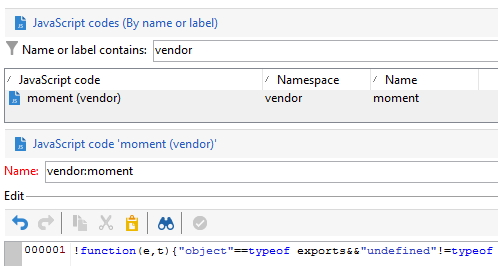
Save it.
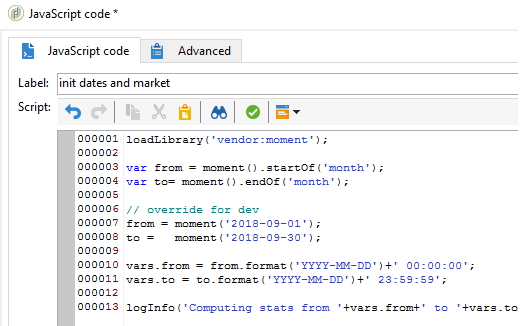
Now in a workflow you can use it as any other standard library:
Example with lodash
Copy from https://underscorejs.org/underscore-min.js and paste to vendor:undescore:
//     Underscore.js 1.9.1
//     http://underscorejs.org
//     (c) 2009-2018 Jeremy Ashkenas, DocumentCloud and Investigative Reporters & Editors
//     Underscore may be freely distributed under the MIT license.
!function(){var n="object"==typeof self&&self.self===self&&self||"object"==typeof global&&global.global===[...]
In any Javascript activity, you can now use it with loadLibrary('vendor:undescore'):
loadLibrary("vendor:underscore");

_.map([1, 2, 3], function (num) {
  return num * 3;
});
// => [3, 6, 9]
Example with MomentJS
Copy from https://cdn.jsdelivr.net/npm/[email protected]/min/moment.min.js and paste it to vendor:moment:
!function(e,t){"object"==typeof exports&&"undefined"!=typeof module?module.exports=t():"function"==typeof define&&def[...]
In any Javascript activity, you can now use it with loadLibrary('vendor:moment'):
loadLibrary("vendor:moment");

var yesterday = moment().subtract(1, "day");
logInfo(yesterday.format("YYYY-MM-DD HH:mm:ss")); // 2020-07-27 15:12:59
var tomorrow = moment().add(1, "day");
logInfo(tomorrow.format("YYYY-MM-DD HH:mm:ss")); // 2020-07-29 15:12:59
To handle MomentJS locales (https://momentjs.com/docs/#/i18n/instance-locale/), use https://cdn.jsdelivr.net/npm/[email protected]/min/locales.min.js in vendor:moment-locales
Then:
loadLibrary("vendor:moment");
loadLibrary("vendor:moment-locales");

var yesterday = moment().subtract(1, "day");
yesterday.locale("fr");
logInfo(yesterday.format("dddd D MMMM")); // lundi 27 juillet
yesterday.locale("us");
logInfo(yesterday.format("dddd D MMMM")); // Monday 27 July
Get and install an NPM library
Get any email validator lib, such as https://github.com/manishsaraan/email-validator.
Copy and paste it to a new javascript code vendor:email-validator.
As it is an NodeJS lib, wrap it into a class:
[...]
var validator = new function(){
  this.validate = function(email){
    [...]
  }
}