
Streamline data workflows with Alteryx: connect to multiple data sources, prepare and transform data, and output to various formats.
The core tools are listed by stage (input, preparation, transformation, output), then combined in a business case splitting one sales file into tickets and lines.
Walkthrough
Input
-
Input Data: data from source: File, SQL (Microsoft SQL Server, Oracle, MySQL, PostgreSQL), Adobe Analytics, Amazon (S3, Redshift, Aurora), Microsoft (Datalake, Data warehouse, Azure db, Onedrive, Sharepoint), google (big query, sheets, analytics), Salesforce, SAP Hana -
Directory: files from local directory -
Text Input: raw input by user
Output
-
Browse: instant debug data+metadata, column completion, etc -
Output Data: output CSV/TSV/JSON/Excel xlsx/Access/Amazon/BigQuery/Qlik View/Tableau/… file
Data preparation
-
Select: Set column type (bool, varchar, date, time, datetime, int, float), column name and size -
Formula: Update existing columns and/or create new columns with formula. Functions include Substring, Mathematics operations, Conditional if then elseif then else then, File, min/max… -
Filter: Filter based on simple criteria (X equal/does not equal/contains/does not contain/null/empty/after/before) or complex with formula. Includes 2 out transitions:Truefor rows matching criteria, andFalsefor others
Transform
-
Summarize: for GROUP BY equivalent with aggregate on column: group by/min/max/first/last/sum/count/…
Business Case
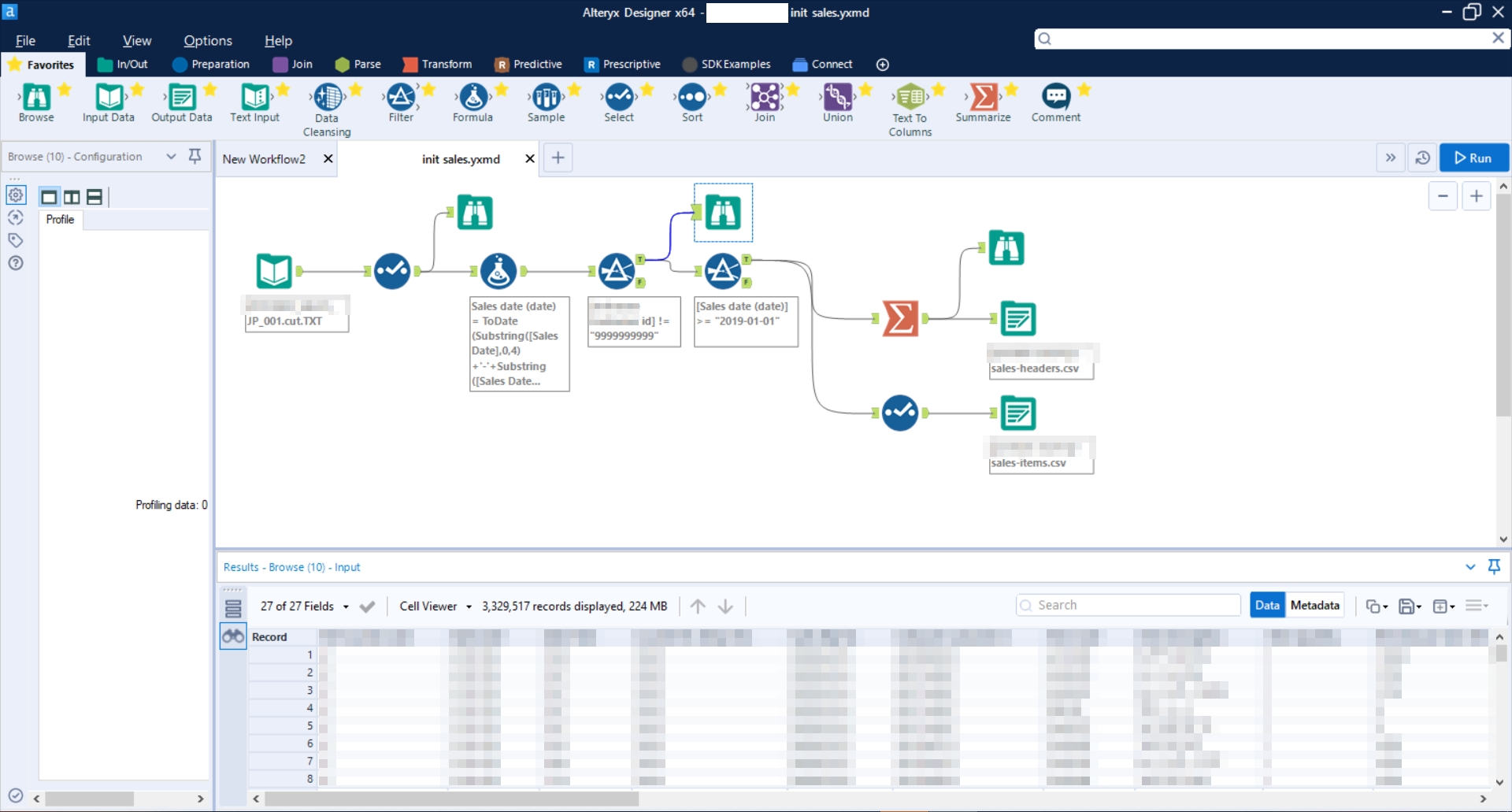
1 Sales input file to:
- 1 Sale Header (Tickets) file
- 1 Sale Items (Lines) file
Using Input Data, Select, Filter, Browse, Summarize, and Output Data
Going further
- Use Node-RED for automation: a free, self-hosted visual tool to query APIs and trigger actions
- How to send an email from Javascript with Zapier: another no-code automation