
Connect Adobe Campaign to Azure using AzCopy! Download, upload, sync files from and to Azure with 1 Javascript Function!
🌍☁️📂
Install AzCopy on Adobe Campaign through FTP
- Download AzCopy v10 from docs.microsoft.com/en-us/azure/storage/common/storage-use-azcopy-v10
- Unzip it on your PC
- On your Adobe FTP Instance, create a
/bin/folder and Refresh - Upload
azcopy_linux_amd64_10.7.0folder to your FTP instance: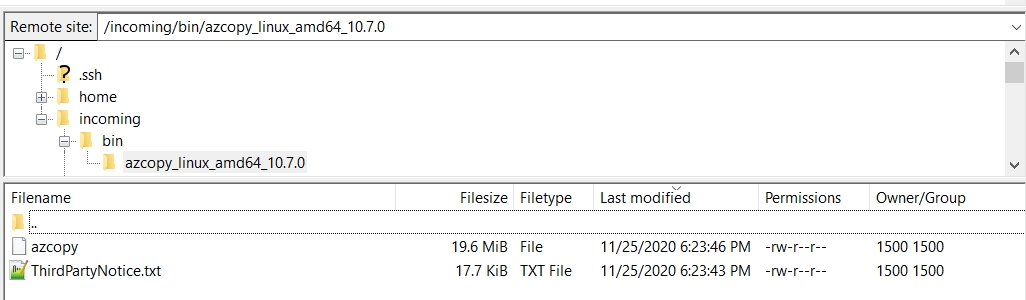
-
Right Clickthe folder >Change File Attributes> Make sure the Group canRead, Write and Executeand theRecurse into subdirectoriesis checked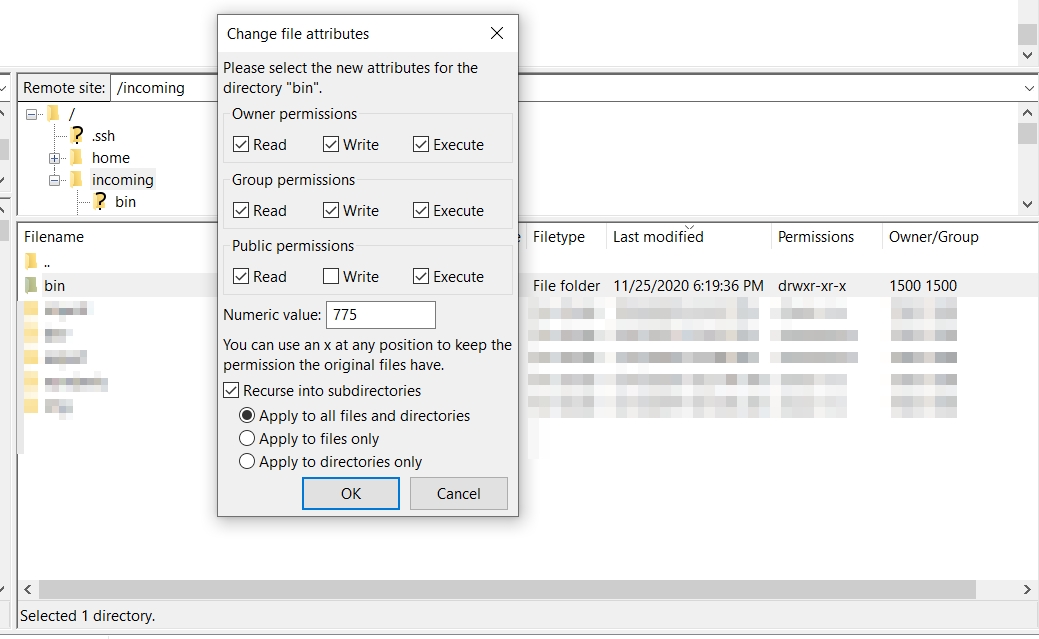
Execute AzCopy from Adobe Campaign
Create an empty workflow with a Javascript Activity connected to an End activity.
Use the following code:
function azcopy(command){
  var azcopyPath = '/home/customers/instance_name/incoming/bin/azcopy_linux_amd64_10.7.0/azcopy'; // change with your actual path
  var result = execCommand(azcopyPath+' '+command, true); // @return [linux result code, output] @see https://myrosblog.com/2019/03/adobe-campaign-helpers
  for each (var line in result[1].split('\n')){
      logInfo(''+line); // display output
  }
}

azcopy('-h'); // call "azcopy -h"
azcopy('env'); // call "azcopy env"
/!\ Update the value of azcopyPath with the full filepath on your instance. On AWS instances, it starts with /sftp/instance_name/, whereas on old instances it starts with /home/customers/instance_name.
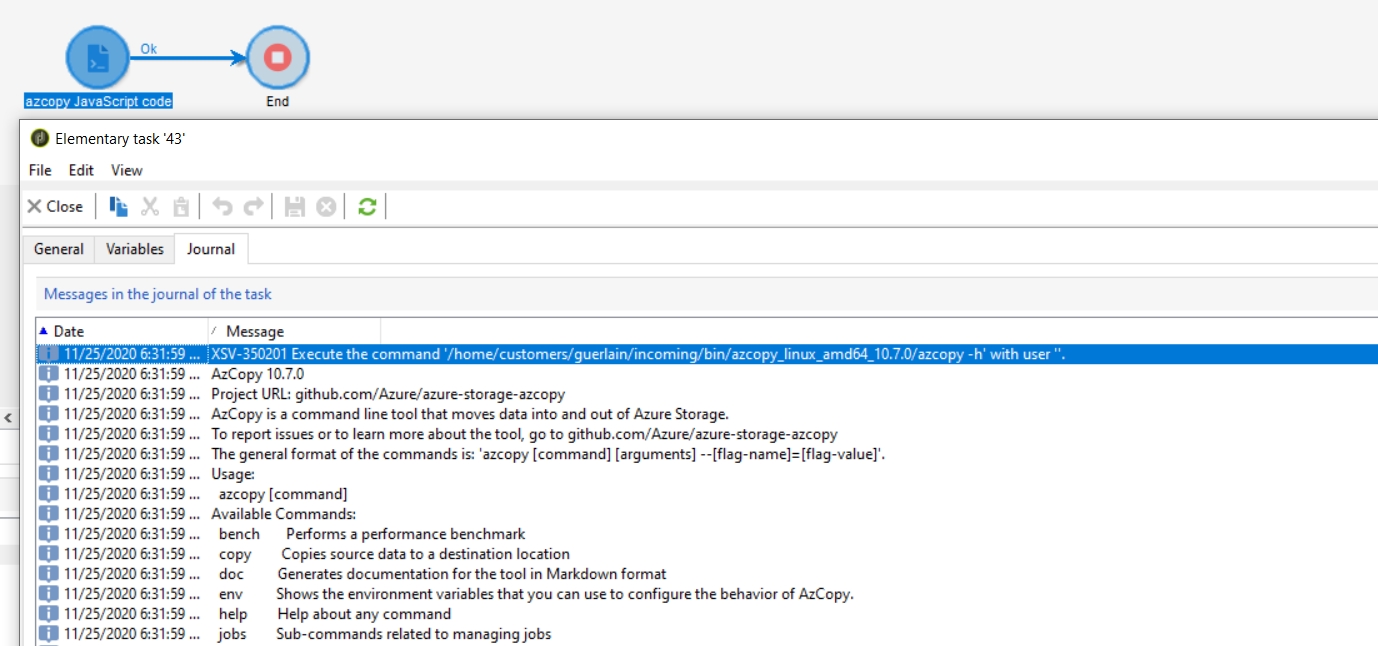
Azcopy is installed and ready to use!
Output:
11/25/2020 6:31:59 PM	XSV-350201 Execute the command '/home/customers/instance/incoming/bin/azcopy_linux_amd64_10.7.0/azcopy -h' with user ''.
11/25/2020 6:31:59 PM	AzCopy 10.7.0
11/25/2020 6:31:59 PM	Project URL: github.com/Azure/azure-storage-azcopy
11/25/2020 6:31:59 PM	AzCopy is a command line tool that moves data into and out of Azure Storage.
11/25/2020 6:31:59 PM	To report issues or to learn more about the tool, go to github.com/Azure/azure-storage-azcopy
11/25/2020 6:31:59 PM	The general format of the commands is: 'azcopy [command] [arguments] --[flag-name]=[flag-value]'.
11/25/2020 6:31:59 PM	Usage:
11/25/2020 6:31:59 PM	  azcopy [command]
11/25/2020 6:31:59 PM	Available Commands:
11/25/2020 6:31:59 PM	  bench       Performs a performance benchmark
11/25/2020 6:31:59 PM	  copy        Copies source data to a destination location
[...]
Upload file from Adobe Campaign to Azure
Usage with SAS token (Recommended)
With an absolute filepath:
azcopy(
  'cp "/sftp/instance/my_file.csv" "https://instance.blob.core.windows.net/container/folder1/folder2/?{Your SAS here}"'
); // use with SAS
With vars.filename coming from a previous Workflow Activity:
azcopy(
  "cp " +
    vars.filename +
    ' "https://instance.blob.core.windows.net/container/folder1/folder2/?{Your SAS here}"'
); // use with SAS
Output:
11/25/2020 12:37:17 PM	XSV-350201 Execute the command '/home/customers/instance_name/incoming/bin/azcopy_linux_amd64_10.7.0/azcopy cp "/home/customers/instance_name/incoming/xxx.txt" "https://instance.blob.core.windows.net
11/25/2020 12:37:17 PM	/folder1/folder2/?SAS"' with user ''.
11/25/2020 12:37:19 PM	INFO: Scanning...
11/25/2020 12:37:19 PM	INFO: Any empty folders will not be processed, because source and/or destination doesn't have full folder support
11/25/2020 12:37:19 PM	Job c519d653-ef38-a34b-542a-5d66e2267b90 has started
11/25/2020 12:37:19 PM	Log file is located at: /usr/local/neolane/.azcopy/c519d653-ef38-a34b-542a-5d66e2267b90.log
11/25/2020 12:37:19 PM	 0.0 %, 0 Done, 0 Failed, 1 Pending, 0 Skipped, 1 Total,
11/25/2020 12:37:19 PM	Job c519d653-ef38-a34b-542a-5d66e2267b90 summary
11/25/2020 12:37:19 PM	Elapsed Time (Minutes): 0.0334
11/25/2020 12:37:19 PM	Number of File Transfers: 1
11/25/2020 12:37:19 PM	Number of Folder Property Transfers: 0
11/25/2020 12:37:19 PM	Total Number of Transfers: 1
11/25/2020 12:37:19 PM	Number of Transfers Completed: 1
11/25/2020 12:37:19 PM	Number of Transfers Failed: 0
11/25/2020 12:37:19 PM	Number of Transfers Skipped: 0
11/25/2020 12:37:19 PM	TotalBytesTransferred: 18089
11/25/2020 12:37:19 PM	Final Job Status: Completed
Note: the log file is available in /usr/local/neolane/.azcopy/.
Note 2: if using file instead of blob, change URL to .file instead of .blob.
Refactor with Adobe Campaign options for re-use and environments management
Create a Javascript code fco:helpers and add the following:
function azcopy(command){
  var azcopyPath = '/home/customers/instance_name/incoming/bin/azcopy_linux_amd64_10.7.0/azcopy'; // change with your actual path
  var result = execCommand(azcopyPath+' '+command, true); // @return [linux result code, output] @see https://myrosblog.com/2019/03/adobe-campaign-helpers
  for each (var line in result[1].split('\n')){
      logInfo(''+line); // display output
  }
}
function azcopyCopy(account, container, token, file){
  azcopy('copy "'+file+'" "'+account+container+token+'"');
}
Then, in a workflow:
loadLibrary("fco:helpers");
var account = getOption("fcoAzureClientelingCampaignAccount"); //'https://azure_instance.blob.core.windows.net';
var container = getOption("fcoAzureClientelingCampaignContainer"); //'/folder1/folder2/';
var token = getOption("fcoAzureClientelingCampaignToken"); //'?sv=20YY-12-01&ss=xxx&srt=xxx&sp=xxx&se=20YY-01-01TxxxZ&st=20YY-01-01TxxxZ&spr=https&sig=xxx';
var file = vars.filename;
azcopyCopy(account, container, token, file);
Usage with Dest Key (deprecated)
azcopy(
  "cp /Source:myfile.csv /Dest:https://instance.blob.core.windows.net/container/folder1/folder2/ /destKey:{Your Key here}"
); // use with Key