
To target, report, deduplicate and prepare data, Adobe Campaign provides JavaScript helpers to interact with the database.
This article will walk you through read/update operations like NLWS.nmsDelivery.load("12435"), NLWS.nmsRecipient.create({ firstName:"John" }) and build complex queries. All tested in a sandbox instance.
Choosing between Activity, queryDef and SQL? Head to the AC database, or get to know the webservices in AC Architecture.
Preparation
You’ll have to login to an Adobe Campaign instance with the workflow permission. Create a workflow with a JavaScript activity. Need an instance? Check this article to install Adobe Campaign locally on Windows.
Walkthrough
Get 1 delivery: NLWS & load
const delivery = NLWS.nmsDelivery.load("10151"); // get via @id
logInfo(delivery.label); // get the Delivery Label (string)
logInfo(delivery.scheduling.contactDate); // get the Delivery Contact date (Date)
logInfo(delivery.indicators.processed); // get the Delivery Processed (number)
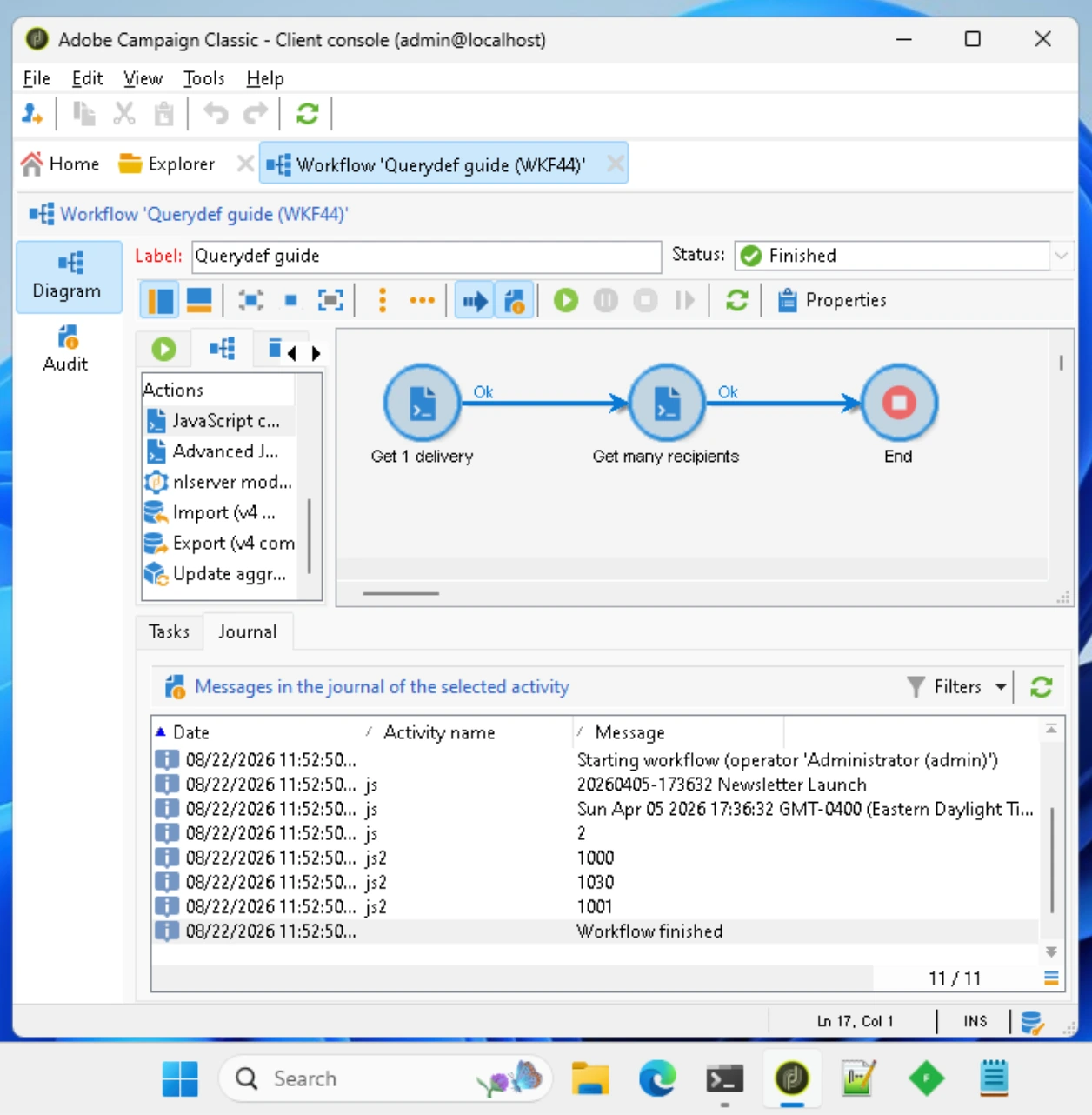
Get many recipients: NLWS & queryDef
const query = NLWS.xtkQueryDef.create({
  queryDef: {
    operation: "select",
    schema: "nms:recipient", // query the Recipient schema
    select: { node: [{ expr: "@id" }] }, // get @id
    where: {
      condition: [
        { expr: "@email LIKE '%@yopmail.com'" }, // filter by email
      ],
    },
  },
});
const recipients = query.ExecuteQuery();
recipients.getElements().forEach(function (recipient) {
  logInfo(recipient.$id); // log the @id of each recipient
});
Query reference available in
📕 queryDef
Create a recipient
// get via @id, then edit and save
var delivery = NLWS.nmsDelivery.load("12435");
delivery.label = "New label";
delivery.save();

// create via JSON, edit via JS and save (the key 'x' doesn't matter)
var recipient = NLWS.nmsRecipient.create({
  x: {
    email: "[email protected]",
  },
});
recipient.folder_id = 1183;
recipient.firstName = "John";
recipient.lastName = "Doe";
recipient.save();
Get with JSON
var email = "[email protected]";
var query = NLWS.xtkQueryDef.create({
  queryDef: {
    schema: "nms:recipient",
    operation: "get", // "get" does a SQL "LIMIT 1"
    select: { node: [{ expr: "@id" }] }, // get @id only
    where: {
      condition: [
        { expr: "@email = '" + email + "'" }, // filter by email
        { expr: "@firstName LIKE '%" + name + "%'" }, // and first name
      ],
      orderBy: { node: [{ expr: "@lastModified", sortDesc: "true" }] }, // ORDER BY lastModified DESC
    },
  },
});
var res = query.ExecuteQuery(); // @throw Exception if the recipient doesn't exist, use operation:"getIfExists" if recipient may not exist
// res is an XML object such as <recipient id="1234"/>
var recipient = NLWS.nmsRecipient.load(res.$id); // conversion to a Javascript object
recipient.email = null;
recipient.save();
SQL Insert into helper
var fields = {
  sFirstName: vFirstName,
  sLastName: vLastName,
};
var log = false;
insertInto(vars.tableName, fields, log);
See the Adobe Campaign helpers (SQL, string, XML, linux..)
Select multiple with where and orderBy
Base query to get all Deliveries BUT Proofs BEFORE the beginning of the month, MAXIMUM 3 results:
var q = NLWS.xtkQueryDef.create({
  queryDef: {
    schema: "nms:delivery",
    operation: "select",
    lineCount: "3",
    select: {
      node: [{ expr: "@id" }, { expr: "@label" }],
    },
    where: {
      condition: [
        { expr: "@label NOT LIKE '%Proof%'", "bool-operator": "AND" },
        { expr: "@created <= '2018-08-01'", "bool-operator": "AND" },
      ],
    },
    orderBy: { node: [{ expr: "@lastModified", sortDesc: "true" }] },
  },
});
var deliveries = q.ExecuteQuery();
deliveries.delivery.forEach(function (delivery) {
  logInfo(delivery["@label"]);
});
Select raw data from workflow transition
Plug a query into a javascript activity, then in the JS, retrieve the results. Useful for DQM with JS functions.
With JSON and queryDef using vars.targetSchema (on a nms:recipient schema Query, to clean email addresses):
var query = NLWS.xtkQueryDef.create({
  queryDef: {
    schema: vars.targetSchema,
    operation: "select",
    lineCount: 999999999, // /!\ lineCount defaults to 10,000
    select: { node: [{ expr: "@id" }, { expr: "@email" }] },
  },
});
var records = query.ExecuteQuery(); // DOMElement

records.getElements().forEach(function (record) {
  logInfo(record.$id);
  var cleanedEmail = record.$email.replace(/\s+/g, "").toLowerCase();
  sqlExec(
    "UPDATE " + vars.tableName + " SET sEmail=$(sz) WHERE iId=$(l)",
    cleanedEmail,
    record.$id
  );
});
To avoid SQL injections, use bound parameters with $(). Types and doc can be found in
📕 sqlExec.
See this queryDef in action in the Monitor your paused workflows business case.
With Raw SQL table vars.tableName:
var xml = sqlSelect(
  "collection,@id",
  "SELECT iId as id FROM " + vars.tableName
); // <select><collection id="1"/><collection id="2"/></select>
logInfo(xml.toXMLString()); // "<select><collection id="1"/><collection id="2"/></select>"
xml.collection.forEach(function (record) {
  logInfo("id:" + record["@id"]); // "id: 1" "id: 2"
  // if the query was based on nms:recipient, retrieve the JS recipient with:
  var recipient = NLWS.nmsRecipient.load(record["@id"]);
  logInfo(recipient.email);
  recipient.lastName = recipient.lastName.toUpperCase();
  recipient.save();
});
Full reference available in
📕 sqlSelect.
Distribution of values
Get the distribution of the field ‘@countryCode’ for all Recipients:
/**
 * @class DistributionOfValues
 * @param schema string
 * @param field string
 */
function DistributionOfValues(schema, field) {
  this.queryDef = {
    operation: "select",
    lineCount: 200,
    schema: schema,
    select: {
      node: [
        { alias: "@expr", expr: field, groupBy: "true", noSqlBind: "true" },
        { alias: "@count", expr: "COUNT()", label: "Count" },
      ],
    },
    orderBy: { node: [{ expr: "COUNT()", sortDesc: "true" }] },
  };
  /*
   * @return an XML list
   */
  this.get = function () {
    this.results = NLWS.xtkQueryDef
      .create({ queryDef: this.queryDef })
      .ExecuteQuery();
    return this.results.getElements();
  };
}

var d = new DistributionOfValues("nms:recipient", "[location/@countryCode]");
// ability to edit the query at this point
d.queryDef.where = {
  condition: [{ expr: "DateOnly(@created) = #2019-08-26#" }],
};
// get
d.get().forEach(function (result) {
  logInfo(result.$expr + ": " + result.$count);
});
Output:
FR: 999
UK: 50
US: 1
Validation & troubleshooting
How to test
To test queryDef and NLWS operations, ensure that the queries are correctly formed and that the results are as expected. Verify that updates and inserts are working as intended.
Common errors
-
Invalid queries: Ensure that the
queryDefis correctly structured and that the schema and fields are valid. - Missing data: Verify that the data being queried exists and that the filters are correctly applied.
Going further
COUNT
jobCount = NLWS.xtkQueryDef.create({
  queryDef: {
    schema: "nms:remaHypothesis",
    operation: "get",
    select: {
      node: [{ expr: "Count(@id)", alias: "@count" }],
    },
    where: {
      condition: {
        expr: "@status=" + HYPOTHESIS_STATUS_RUNNING,
      },
    },
  },
});

iJobCount = iJobCount + parseInt(jobCount.ExecuteQuery()["@count"]);
COUNT DISTINCT
var xmlQuery = {
  queryDef: {
    schema: "nms:trackingLogRcp",
    operation: "select",
    lineCount: "1000000",
    select: {
      node: [
        { expr: "DateOnly(@logDate)", groupBy: "1" },
        { expr: "@userAgent", groupBy: "1" },
        { expr: "count(@id)" },
        { expr: "countDistinct([@broadLog-id])" },
      ],
    },
    where: {
      condition: {
        expr:
          "@logDate IS NOT NULL and @logDate < #" +
          today +
          "# and [@url-id] <> 1",
      },
    },
  },
};
Construct a where step by step
Append a Where condition / date Format.toISO8601
if (condition) {
  xmlQuery.where.appendChild({
    condition: {
      expr: "@logDate >= #" + Format.toISO8601(lastConsolidation) + "#",
    },
  });
}
var result = NLWS.xtkQueryDef.create(xmlQuery).ExecuteQuery();
Append a where to an empty <where/>
// fill select from loop
var select = new XML("<select />");
space.targetKey.forEach(function (key) {
  select.appendChild(
    new XML("<node expr='" + xpath + "' alias='@tmp" + j + "' />")
  );
});

// fill where from loop
var where = new XML("<where />");
for (var i = 0; i < aPKXPaths.length; i++) {
  where.appendChild(
    new XML(
      '<condition expr="' +
        aPKXPaths[i] +
        "=" +
        keyValue +
        '" bool-operator="AND" />'
    )
  );
}

// create query
var xmlQryKeys = new XML(
  '<queryDef operation="get" schema="' + strTargetSchema + '" />'
);
xmlQryKeys.appendChild(select);
xmlQryKeys.appendChild(where);
Batch delivery update
Plug a nms:delivery query to a JS code with:
var query = NLWS.xtkQueryDef.create({
  queryDef: {
    schema: vars.targetSchema,
    operation: "select",
    lineCount: 999999999, // /!\ lineCount defaults to 10,000
    select: { node: [{ expr: "@id" }] },
  },
});
var records = query.ExecuteQuery(); // DOMElement

records.getElements().forEach(function (record) {
  var delivery = NLWS.nmsDelivery.load(record.$id);
  var oldLabel = delivery.label.toString();
  var newLabel = oldLabel.replace(/XXX/, "AAA").replace(/\s/g, "_");
  logInfo(delivery.id + ":", oldLabel, "=>", newLabel);
  delivery.label = newLabel;
  delivery.scenario.labelScript =
    newLabel + '_<%= formatDate(new Date(), "%4Y%2M") %>';
  delivery.save();
});
Raw SQL code execution
instance.engine / exec with parameters / date Format.parseDateTimeInter
var dbEngine = instance.engine;
dbEngine.exec(
  "UPDATE NmsUserAgentStats SET iVisitorsOfTheDay=" +
    record["@visitors"] +
    " WHERE tsDate = $(dt)",
  Format.parseDateTimeInter(record["@date"].toString())
);