
Analyze SOAP traffic between Adobe Campaign Console and Application Server to debug integration issues, monitor API calls, or understand the protocol flow when you lack direct server access.
Using Fiddler as an HTTP proxy, you can capture, inspect, and analyze all SOAP requests and responses in real-time, providing full visibility into Adobe Campaign’s communication.
Preparation
- Get Fiddler from https://www.telerik.com/download/fiddler
- Say your instance URL is
https://mkt-stage1.campaign.adobe.com - Create a new Connection named
Fiddlerwith the instance URL set tohttps://myinstance 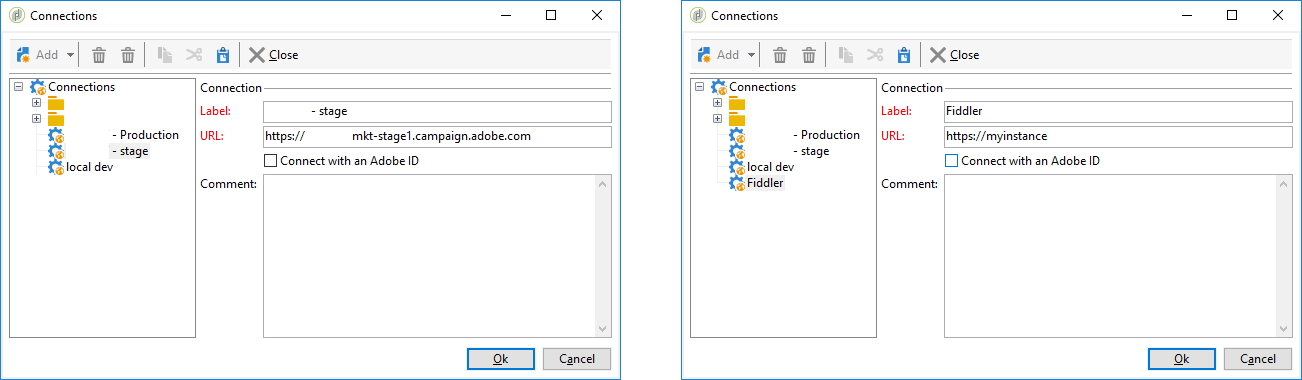
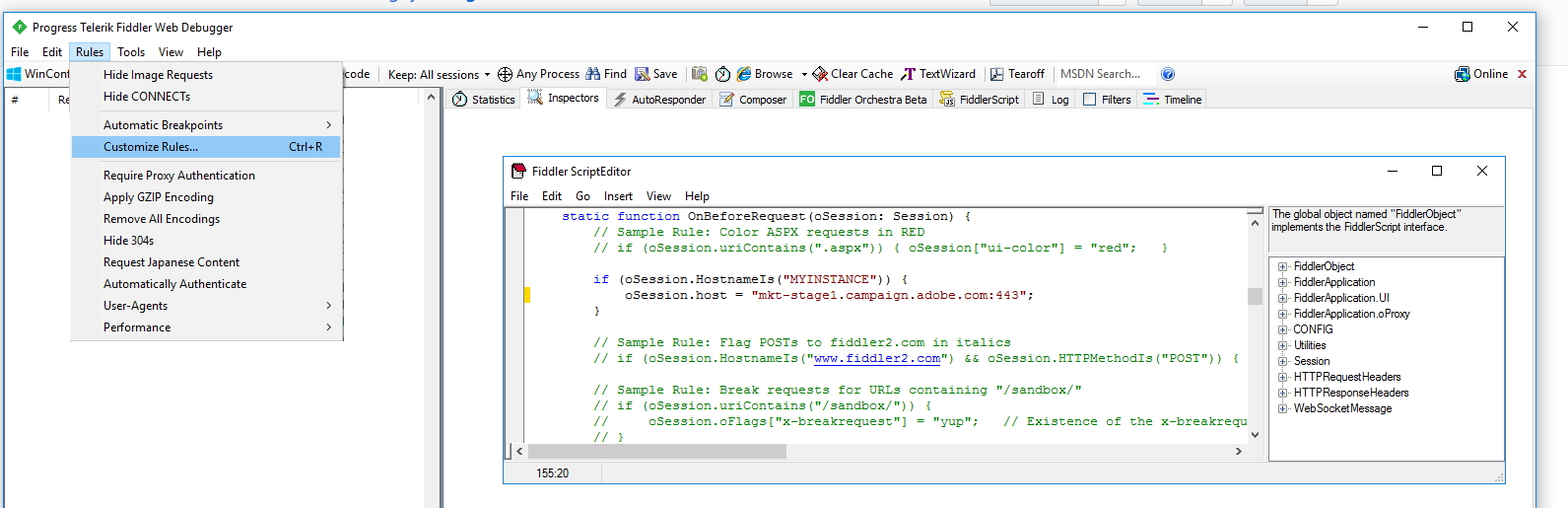
- Open Fiddler, go to Rule > Customize Rules, it will open the Fiddler Script Editor
- Look for
static function OnBeforeRequest(oSession: Session){ - Add the following code, just after the opening curly bracket
{:
static function OnBeforeRequest(oSession: Session){
  if (oSession.HostnameIs("MYINSTANCE")) {
    oSession.host = "mkt-stage1.campaign.adobe.com:443"; // use 80 for HTTP, 443 for HTTPS or 8080 for Tomcat
  }
  // rest of the code
- Enable HTTPS in Fiddler in Tools > Fiddler Options > HTTPS > Decrypt HTTPS

Walkthrough
Browse to different folders, workflows or schemas from your console, and check Fiddler:
- Example of a
xtk:folderLoadChildrenWithPathSOAP call (JSAPI for LoadChildrenWithPath): 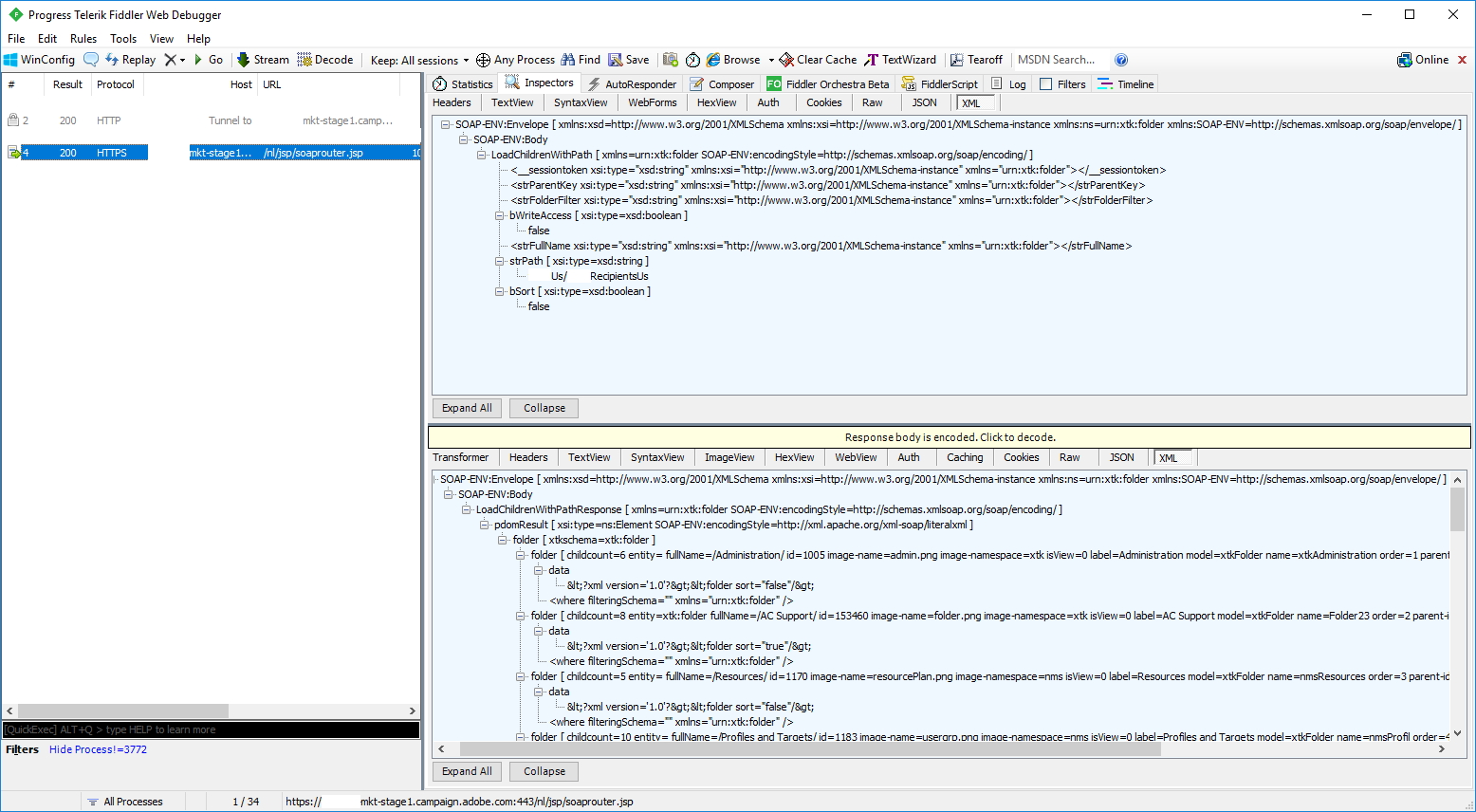
- Example of a
xtk:queryDefExecuteQuerySOAP call (JSAPI for ExecuteQuery): 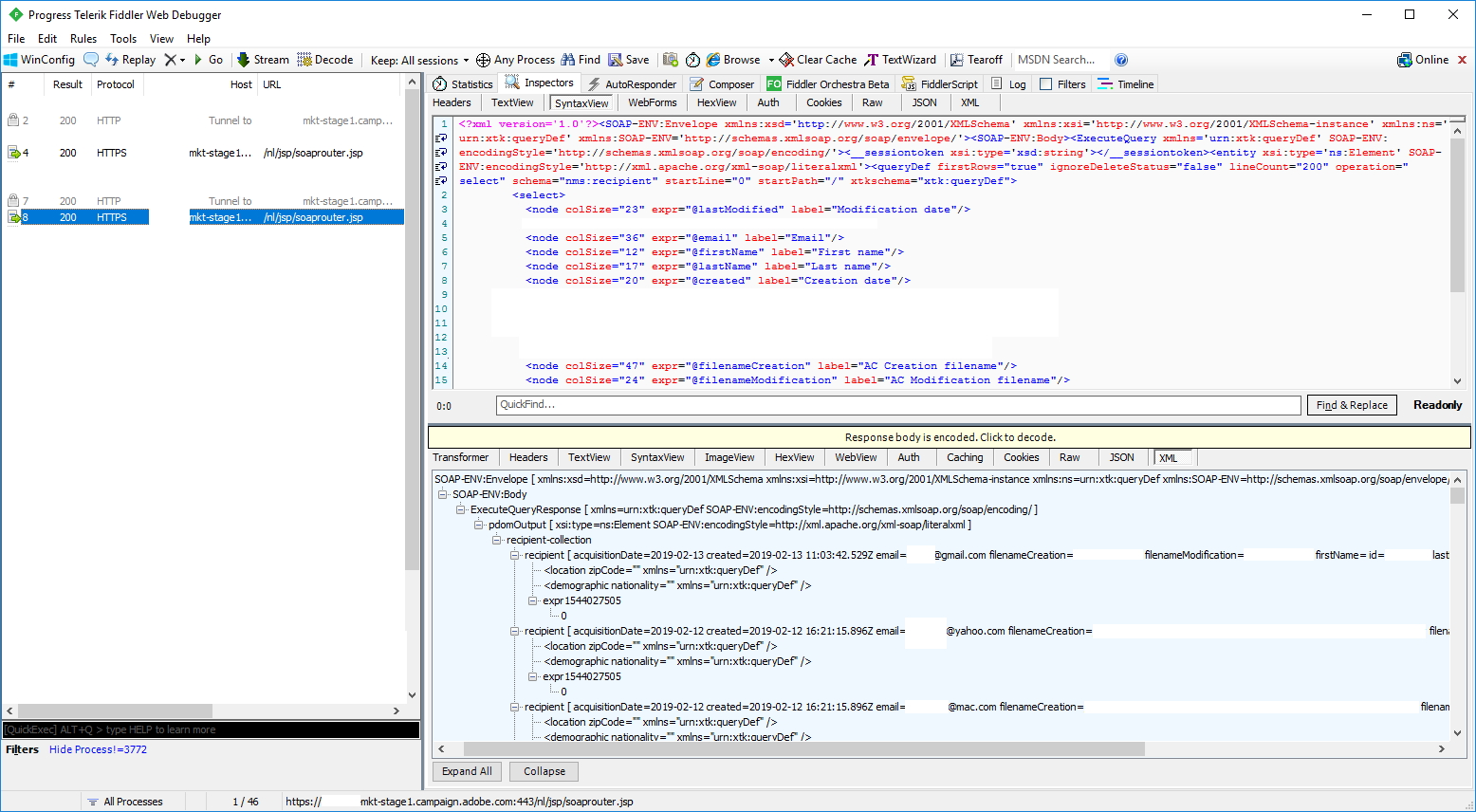
Validation & troubleshooting
- GET /r/config
- POST /nl/jsp/soaprouter.jsp, SOAPAction: xtk:session#Logon, strLogin:internal, strPassword:internal, Response:
<sessionInfo>
  <serverInfo advisedClientBuildNumber="0" advisedClientName="" advisedClientVersion="" allowSQL="false" buildNumber="9364" commitId="8f3ef8e" databaseId="" defaultNameSpace="cus" fohVersion="2" instanceName="instance1" majNumber="6" minClientBuildNumber="9333" minNumber="7" minNumberTechnical="0" releaseName="7.3.4" securityTimeOut="86400" serverDate="" servicePack="0" sessionTimeOut="86400" useVault="false" webView2Mode="1" wizardToLaunch="xtk:createdb" xmlns="urn:xtk:session" />
  <userInfo datakitInDatabase="false" homeDir="" instanceLocale="en-US" locale="en-US" login="internal" loginCS="Internal account" loginId="0" noConsoleCnx="false" orgUnitId="0" theme="" timezone="America/Los_Angeles" xmlns="urn:xtk:session" />
</sessionInfo>
- POST /nl/jsp/soaprouter.jsp, xtk:persist#GetEntityIfMoreRecent,
<strPk>xtk:navtree|xtk:merged</strPk>, Response:
<pdomDoc xsi:type="ns:Element" SOAP-ENV:encodingStyle="http://xml.apache.org/xml-soap/literalxml" xmlns:SOAP-ENV="http://schemas.xmlsoap.org/soap/envelope/" xmlns:xsi="http://www.w3.org/2001/XMLSchema-instance" xmlns="urn:wpp:default"></pdomDoc>
- POST /nl/jsp/soaprouter.jsp, xtk:persist#GetEntityIfMoreRecent,
<strPk>xtk:form|xtk:createdb</strPk> - POST /nl/jsp/soaprouter.jsp, xtk:persist#GetEntityIfMoreRecent,
<strPk>xtk:schema|xtk:builder</strPk> - POST /nl/jsp/soaprouter.jsp, xtk:persist#GetEntityIfMoreRecent,
<strPk>xtk:schema|xtk:common</strPk> - POST /nl/jsp/soaprouter.jsp, xtk:persist#GetEntityIfMoreRecent,
<strPk>xtk:schema|xtk:serverConf</strPk> - POST /nl/jsp/soaprouter.jsp, xtk:builder#GetDbParams <FILL IN FORM, THEN HIT START>
- POST /nl/jsp/soaprouter.jsp, xtk:jobInterface|xtk:builder#SubmitSoapCall, Request:
<builder doNotPersist=true xtkschema=xtk:builder>
  <dbcnx login="neolane" password="neolane" provider="PostgreSQL" server="localhost" xmlns="urn:xtk:jobInterface|xtk:builder" />
  <createdbParameters changeAdminPassword=true createNewAccount=true dbName=neolane nlAdminPassword=admin tableSpaceIndex= tableSpaceTemp= tableSpaceUser= tableSpaceWork= tableSpaceWorkIndex= timezone=America/Los_Angeles unicodeData=true utc=true>
    <packages>
      <package enabled="true" hidden="true" img="" label="Initialization package" locked="true" name="core" namespace="xtk" order="1000000" xmlns="urn:xtk:jobInterface|xtk:builder" />
      <package enabled="true" hidden="true" img="" label="systemStrings" locked="true" name="systemStrings" namespace="nms" order="1000000" xmlns="urn:xtk:jobInterface|xtk:builder" />
      <package enabled=true hidden=false img=nms:packages/delivery.png label=Delivery locked=true name=core namespace=nms order=10>
        <depends package="xtk:core"/><depends package="nms:folder"/><depends package="nms:systemStrings"/><depends package="nms:ruleset"/>
        <depends package="nms:country"/><depends package="nms:report"/><depends package="nms:coreInteraction"/>
        <depends package="nms:japanLoc"/><depends package="nms:billing"/><depends package="nms:heatmap"/>
      </package>
    </packages>
  </createdbParameters>
</builder>
Then, first login:
- POST /nl/jsp/soaprouter.jsp, xtk:session#Logon, Response:
<sessionInfo>
  <serverInfo advisedClientBuildNumber="0" advisedClientName="" advisedClientVersion="" allowSQL="false" buildNumber="9364" commitId="8f3ef8e" databaseId="uFE80000000000000650F0DF7EAD7C45100730D20" defaultNameSpace="cus" fohVersion="2" instanceName="instance1" majNumber="6" minClientBuildNumber="9333" minNumber="7" minNumberTechnical="0" releaseName="7.3.4" securityTimeOut="86400" serverDate="2023-11-24 01:06:23.846Z" servicePack="0" sessionTimeOut="86400" useVault="false" webView2Mode="1" xmlns="urn:xtk:session" />
  <userInfo datakitInDatabase=true homeDir= instanceLocale=en-US locale=en-US login=admin loginCS=Administrator (admin) loginId=1059 noConsoleCnx=false orgUnitId=0 theme= timezone=America/Los_Angeles>
    <login-group id="1060"/><login-right right="admin"/>
    <installed-package name="billing" namespace="nms"/><installed-package name="core" namespace="nms"/>
    <installed-package name="coreInteraction" namespace="nms"/><installed-package name="country" namespace="nms"/>
    <installed-package name="folder" namespace="nms"/><installed-package name="heatmap" namespace="nms"/>
    <installed-package name="japanLoc" namespace="nms"/><installed-package name="report" namespace="nms"/>
    <installed-package name="ruleset" namespace="nms"/><installed-package name="systemStrings" namespace="nms"/>
    <installed-package name="core" namespace="xtk"/></userInfo>
    <option name="NmsTracking_UrlDelimiters" type="6" value="() {} []"/><option name="Nms_DefaultRcpSchema" type="6" value="nms:recipient"/>
</sessionInfo>
Going further
- See the full login-to-data call sequence you’ll capture in HTTP flows: Requests and Responses.
- Replay or script those calls with HTTP Post for SOAP calls and asynchronous API calls.