
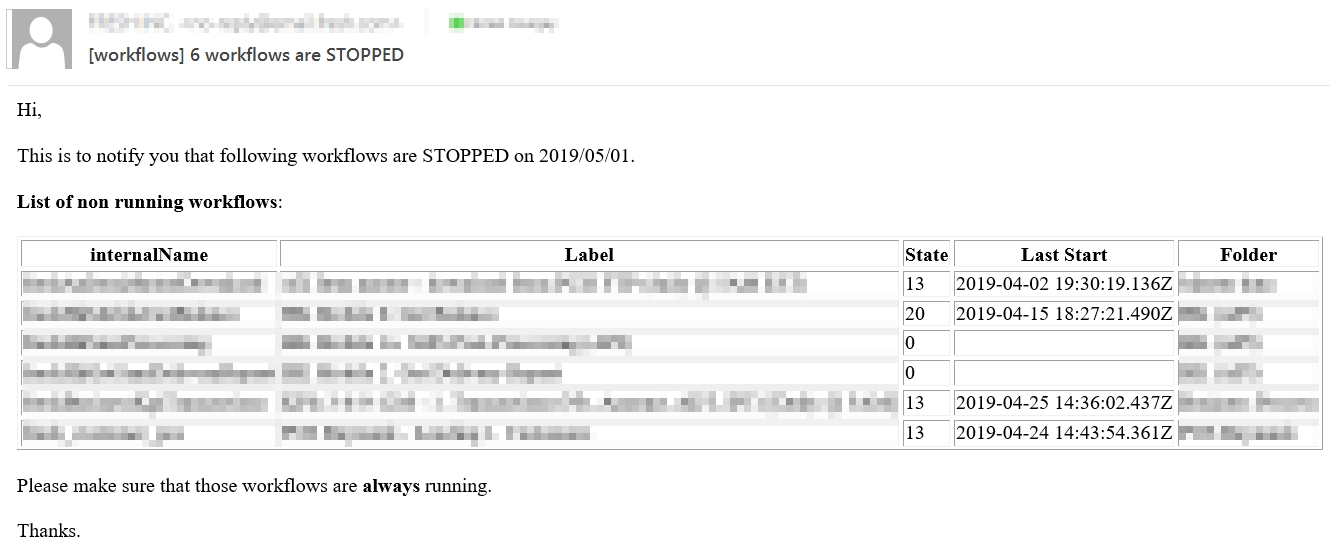
Get notified when critical Adobe Campaign workflows stop running due to paused, failed, or restart-required states.
Using a scheduled workflow with custom JavaScript, and Email Alert activities, you can monitor the status and send detailed notifications to your team.
Goal
Monitor critical workflows and receive daily email alerts when they are not in the “Started” state, including details like Label, Last run date, and Folder.
Preparation
Ensure you have a list of critical workflow internal names that need to be monitored.
Walkthrough
Workflow set up
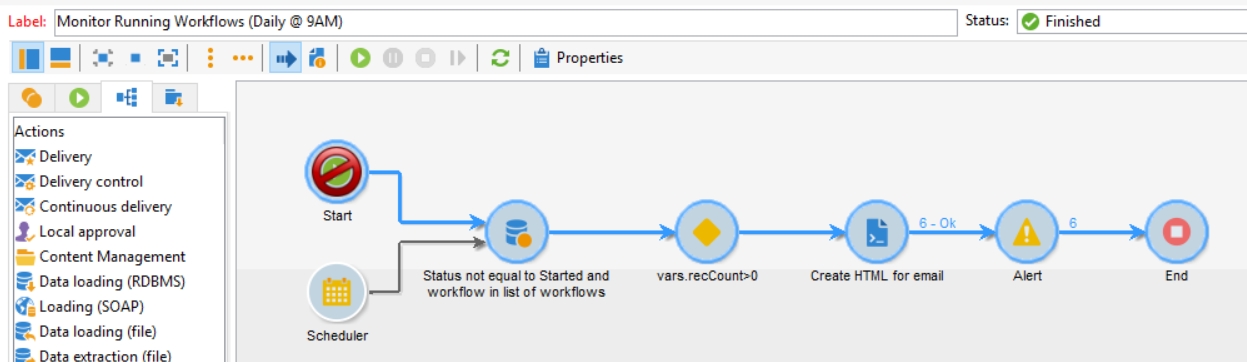
The workflow runs daily @ 9AM and consists of a Scheduler, a Query on workflows, a Javascript activity and an Email Alert:
Query set up
The query is based on xtk:workflow, where the state is different from Started and the internalName is in a whitelist with OR conditions:
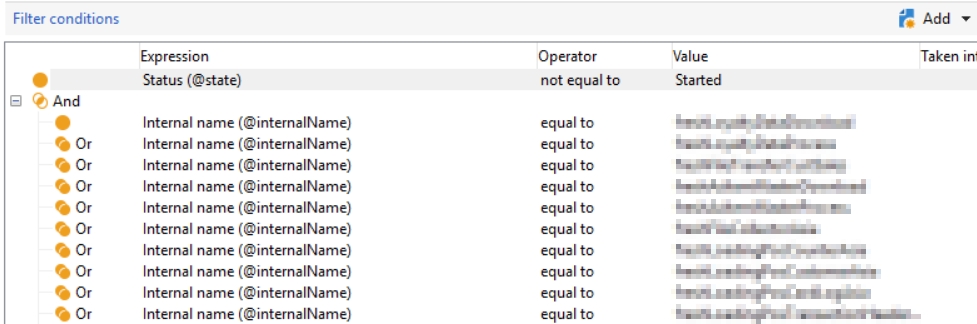
Use additional data to add the columns you need to display:

You can use @folderLabel for the Folder Label alias.
Test activity set up
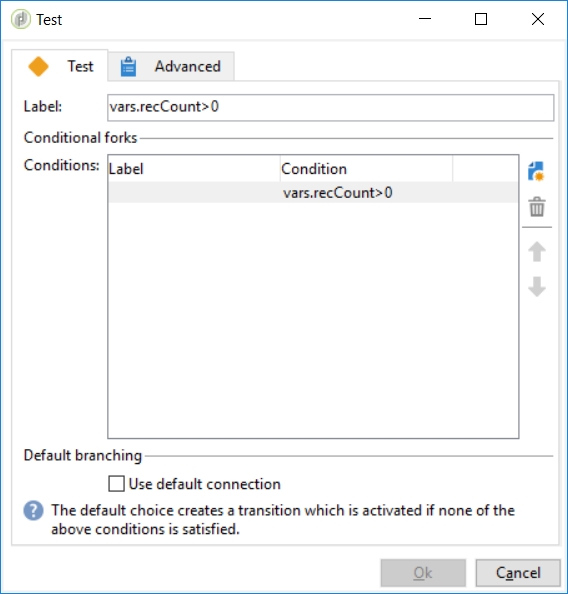
The test activity performs a simple test on vars.recCount > 0 without the default connection:
Javascript activity
The JS builds an HTML table based on the query results:
var query = NLWS.xtkQueryDef.create({queryDef: {
  schema: vars.targetSchema, operation: "select",
  select: { node: [
    {expr: "@internalName"},
    {expr: "@label"},
    {expr: "@folderLabel"},
    {expr: "@lastStart"},
    {expr: "@state"},
  ]},
  orderBy: { node: [{expr:"@label", sortDesc:"false"}] }
}});
var records = query.ExecuteQuery();

vars.htmlEmail = '';
vars.htmlEmail += '<table border="1"><thead>';
vars.htmlEmail += '<tr><th>internalName</th><th>Label</th><th>State</th><th>Last Start</th><th>Folder</th></tr>';
vars.htmlEmail += '</thead><tbody>';
for each(var record in records.getElements()){
  vars.htmlEmail += '<tr>';
  vars.htmlEmail += '<td>'+record.$internalName+'</td>';
  vars.htmlEmail += '<td>'+record.$label+'</td>';
  vars.htmlEmail += '<td>'+record.$state+'</td>';
  vars.htmlEmail += '<td>'+record.$lastStart+'</td>';
  vars.htmlEmail += '<td>'+record.$folderLabel+'</td>';
  vars.htmlEmail += '</tr>';
}
vars.htmlEmail += '</tbody></table>';
More details on the queryDef object on the queryDef toolbox tutorial.
Email activity
The email uses vars.recCount and vars.htmlEmail:
<!DOCTYPE html PUBLIC "-//W3C//DTD HTML 4.0 Transitional//EN">
<html>
<head> </head>
<body>
<p>Hi,</p>
<p>
This is to notify you that following workflows are STOPPED on <%= formatDate(new Date(),
"%4Y/%2M/%2D") %>.
</p>
<p><strong>List of non running workflows</strong>:<br /><%= vars.htmlEmail %></p>
<p>Please make sure that those workflows are <strong>always</strong> running.</p>
<p>Thanks.</p>
</body>
</html>
Validation & troubleshooting
Test the workflow with a small whitelist first to ensure the email is formatted correctly and contains the expected data.
Going further
Reference:
The Javascript activity can be simplified by using a SQL call in the Alert activity’s advanced tab, then using new XML(vars.records) in the email template:
Delete the JS activity. In the advanced tab of the Alert:
var query = NLWS.xtkQueryDef.create({
  queryDef: {
    schema: vars.targetSchema,
    operation: "select",
    select: { node: [{ expr: "@field1" }, { expr: "@field2" }] },
    //  orderBy: { node: [{expr:"@label", sortDesc:"false"}] }
  },
});
var records = query.ExecuteQuery(); // DOMElement
vars.records = records
  .toXMLString() // serialization as a string
  .replace(/query-collection/g, "collection"); // needed because <query-collection> is an invalid node name
In the HTML Source tab of the Alert:
<table>
  <thead>
    <tr>
      <th>field1</th>
      <th>field2</th>
    </tr>
  </thead>
  <tbody>
    <% var records = DOMDocument.fromXMLString(vars.records); for each (var record in
    records.root.getElements()){ %>
    <tr>
      <td><%= record.$field1 %></td>
      <td><%= record.$field2 %></td>
    </tr>
    <% } %>
  </tbody>
</table>