
Identify companies using Adobe Campaign without direct access to their infrastructure — useful for competitive analysis, partnership opportunities, or understanding market adoption.
Using Google dorks and specific Adobe Campaign URL patterns, you can discover publicly accessible mirror pages and build information for any brand running Adobe Campaign.
Preparation
No special preparation needed — only a web browser and Google search.
List
- KPMG
- Subway
- Boots
- La Redoute
- Fnac
- Nissan
- Ford
- Clarins
- L’Occitane
- UBS
- Morgan Stanley
- Société Générale Markets
- Telegraph
- El Pais
- La Fourchette
- Malakoff Mederic Humanic
- Oui SNCF
- Voyages SNCF
- Virgin Atlantics
- Malaysia Arilines
- TAP Portugal
- Le Robert
- Nathan
- La Croix (Bayard)
- France TV Education
- France TV Info
- France TV
- La Caisse des Depots
Going further
Find brands
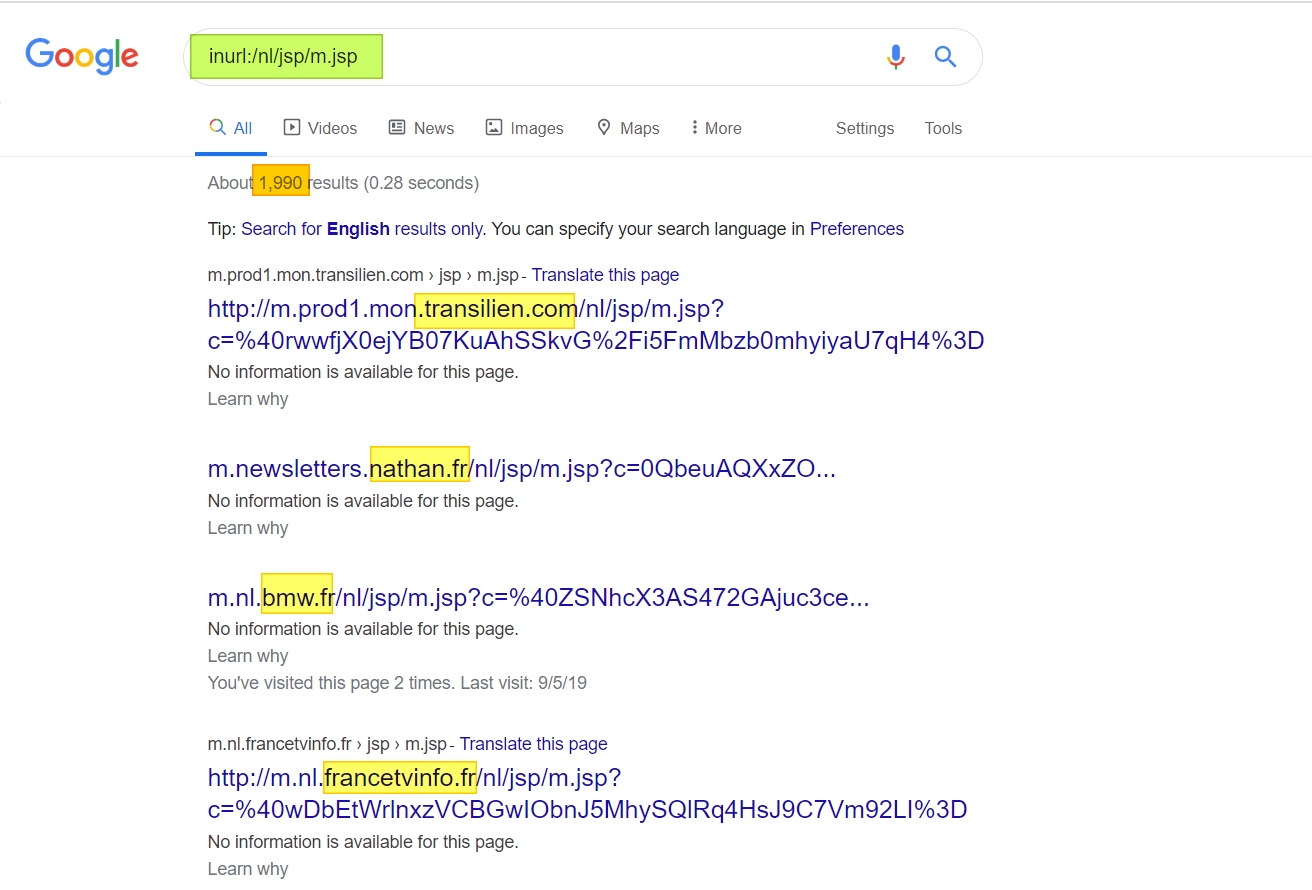
Type in Google Search the following inurl:/nl/jsp/m.jsp:
https://www.google.com/search?q=inurl%3A%2Fnl%2Fjsp%2Fm.jsp
It will display any Google indexed page containing /nl/jsp/m.jsp which is the Adobe Campaign mirror page standard URL:
Find build number and real hostname
Once you have identified a particular website, change the URI to /r/test:
