
Locate, read, and clean up files on your Adobe Campaign server when you don’t have direct filesystem access — for example, to process files dropped by an external system on the FTP server, or purge temporary workflow files that accumulate over time.
Using the JavaScript execCommand function in a workflow, you can execute shell commands directly on the server to find and read files.
Preparation
Use a JavaScript Activity in a workflow:
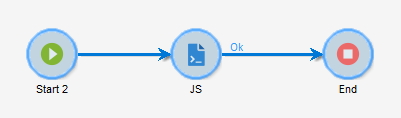
Walkthrough
Using execCommand in a JavaScript Activity
The execCommand function allows you to execute bash commands on the Adobe Campaign server:
/**
 * @param cmd Bash command to be executed on the server
 * @return array[int status, string response]
 * @throw Exception if
 *   - command failed
 *   - the neolane user doesn't have the "createProcess" right
 */
function execCommand(string cmd): array
Basic usage example:
execCommand("id");
However, this won’t display output. To capture and log the result:
var result = execCommand("id");
logInfo(result); // 0,uid=XXXX (aaa) gid=YYYY (bbb) groups=...
Helper function for easier execution
Wrap the command execution in a reusable helper function:
function exec(command, log){
  if(log){
    logInfo('cus:helpers | executing | '+command);
  }
  var result = execCommand(command);
  var lines = result[1].split("\n");
  if(log){
    for each (var line in lines){
      logInfo("" + line);
    }
  }
  return lines;
}
Finding files and examining the server
Use the helper to explore the server:
// Check current user and permissions
exec("id", true); // 0,uid=XXXX (aaa) gid=YYYY (bbb) groups=...

// Check current directory
exec("pwd", true); // /usr/local/neolane/[...]

// Check OS information
exec("cat /etc/issue", true); // Debian GNU/Linux X
exec("uname -a", true); // Linux [...]

// Check user configuration
exec("cat ~/.bashrc", true); // # ~/.bashrc: executed by bash(1) for non-login shells. [...]
Finding specific files
// Find files by name
exec("cd ../../ && pwd && find ./ -name facebookConnector.js", true);
exec("cd ../../ && pwd && find ./ -name twitterConnector.js", true);
Reading file contents
// Read file directly
exec("cd ../../ && pwd && cat deprecated/server/nms/facebookConnector.js", true);
exec("cd ../../ && pwd && cat datakit/nms/eng/js/twitterConnector.js", true);
Searching for text within files
// Find where specific text is defined
exec("cd ../../ && pwd && grep --include=*.xml -rnw . -e ' is mandatory.' ", true);
// Output: ./datakit/nms/eng/package/systemStrings.xml:116:  <dictionaryString locale="en" context="system" object-id="0" sourceId="requiredLog" status="2" text="Field '{1}' is mandatory.">
Working with Apache configuration
// Display Apache configuration
exec("cat /etc/apache2/apache2.conf", true);

// Copy Apache config to your FTP for download
exec("cp /etc/apache2/apache2.conf /sftp/[...]/", true);

// Save Apache envvars to a file
exec("cat /etc/apache2/envvars > /sftp/[...]/", true);
Going further
- Get the content of your serverConf.xml with this tutorial