
XML and JavaScript codes in Adobe Campaign are edited directly in the Client Console which leads to unused variables, missing JSDoc and no standards between developers.
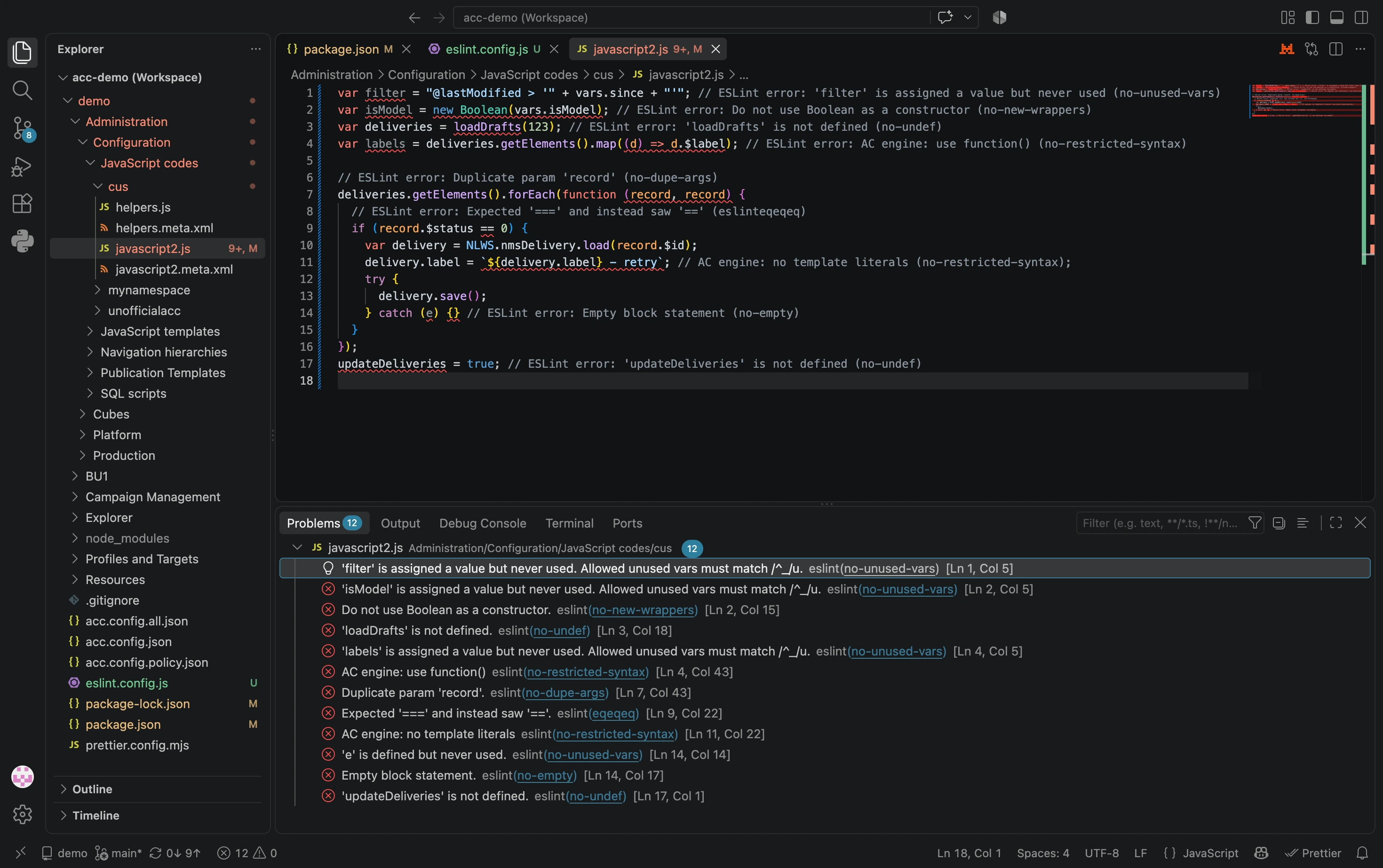
Use acc instance pull to bring your codes to VS Code, then run eslint to enforce consistent code quality. Find below what you will be achieving: unused variables, undefined functions, empty statement, duplicate params…
Preparation
Requirements: Node.js installed, acc authenticated (acc setup), prettier already run (Prettier installation).
Walkthrough
Install ESLint with:
npm i --save-dev eslint
eslint.config.js
Create a new file eslint.config.js and paste:
/**
 * Garantees consistent quality of Adobe Campaign code pulled with `acc` with ESLint.
 *
 * Adobe Campaign JavaScript code can now be controlled with static code analysis
 * And integrated in CI/CD pipelines.
 *
 * @version 2.0.0
 * @author myrosblog.com
 * @see https://myrosblog.com/adobe-campaign/acc-cli/qa-eslint
 */
export default [
  {
    ignores: [
      "**/node_modules/**",
      "**/dist/**",
      "eslint.config.js",
      "prettier.config.mjs",
    ],
    languageOptions: {
      ecmaVersion: 2015, // target ES5
      sourceType: "script", // no ES6 modules (import, export)
      globals: {
        // Adobe Campaign Classic globals
        NLWS: true,
        NL: true,
        loadLibrary: true,
        vars: true,
        // AC log
        logInfo: true,
        logVerbose: true,
        logWarning: true,
        logError: true,
        // AC low-level
        sqlExec: true,
        sqlSelect: true,
        // deprecated
        XML: true,
      },
    },
    rules: {
      // Common-error rules
      "no-cond-assign": "error",
      "no-constant-condition": "error",
      "no-debugger": "error",
      "no-duplicate-case": "error",
      "no-empty": "error",
      "no-extra-semi": "error",
      "no-func-assign": "error",
      "no-unreachable": "error",
      "no-alert": "error", // block alert(), confirm(), prompt()
      "no-eval": "error", // block eval()
      "no-undef": "error", // block undeclared variables
      "no-shadow": "error", // block shadowed variables
      "no-new-wrappers": "error", // block new String(), new Number(), etc.
      "no-dupe-args": "error",
      "no-dupe-keys": "error",
      "no-unused-vars": ["error", { varsIgnorePattern: "^_" }], // ignore variables starting with _
      "no-console": "error", // error on console.log
      eqeqeq: "error", // require === over ==
      "prefer-const": "error", // require const for variables that are never reassigned

      // AC engine: syntax that parses in ESLint but crashes SpiderMonkey 1.8.5
      "no-restricted-syntax": [
        "error",
        {
          selector: "ArrowFunctionExpression",
          message: "AC engine: use function()",
        },
        {
          selector: "TemplateLiteral",
          message: "AC engine: no template literals",
        },
        { selector: "ClassDeclaration", message: "AC engine: no class" },
        { selector: "ClassExpression", message: "AC engine: no class" },
      ],
    },
  },
];
Run it in VSCode
VSCode will automatically apply ESLint configuration when the ESLint extension is installed.
Going further
Run it at scale in terminal
To lint on many files at once, run:
npx eslint 'Administration/Configuration/JavaScript Codes/*.js'
CI/CD
Make it a package.json script for a clean CI/CD:
{
  "scripts": {
    "lint": "eslint --fix .",
    "lint:check": "eslint ."
  }
}
Then available with npm run lint:check.