
Speed up bulk HTTP calls from Adobe Campaign workflows — ideal for External Deliveries that make many unit API calls to vendors.
Using asynchronous HttpClientRequest executions with parallel processing, you can significantly reduce processing time compared to sequential API calls.
Preparation
- External Delivery with Routing type “External”
- Post-Processing workflow configured
- Vendor API endpoint and credentials
Walkthrough
Business Case
Use async HttpClientRequest executions for External Delivery that calls a vendor with unit API calls. Here, the Delivery has a Routing of type “External” with a Post-Processing workflow containing: a Signal, a Javascript code for initialization, a File Loading (containing broadlog id & content), Update date to Update broadlogs status to Pending and the Javascript code with API calls:
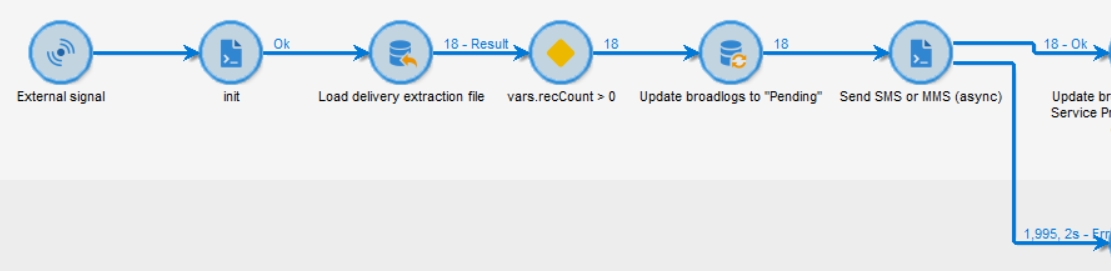
Note: Updating broadlogs Status=Pending is not required if the Delivery Retrieval Mode is set to Manual. Please check Delivery Setup Chapter.
Javascript code
// get data from previous activity
var query = NLWS.xtkQueryDef.create({
  queryDef: {
    schema: vars.targetSchema,
    operation: "select",
    lineCount: 9999999,
    select: {
      node: [{ expr: "@id", alias: "@recordId" }, { expr: "@deliveryId" }],
    },
  },
});
var records = query.ExecuteQuery().getElements();

var endpoint = getOption("endpoint");
var apiKey = getOption("apiKey");

var recCount = vars.recCount; // optimisation: to make sure it's not a XML parsing, we store it as a Javascript variable
var requests = []; // use to store all HttpClientRequest for "HttpClientRequest.wait(requests)"

// function called after each async API call
var onComplete = function (request, context, status) {
  try {
    // any request field may be used i.e. the API key header
    logInfo(request.header["X-API-Key"]);
    // any context value may be used, i.e. the record id
    var recordId = context.recordId;
    // get response data
    var response = request.response;
    // for example, parse XML
    var xmlDoc = DOMDocument.fromXMLString(String(response.body));
    // get a node
    var node1 = xmlDoc.getElementsByTagName("node1");
    var valueNode1 = xmlDoc[0].childNodes[0].nodeValue;
    // update current temporary table
    var sql =
      "UPDATE " +
      vars.tableName +
      " SET sNode1 = '" +
      valueNode1 +
      "' WHERE iId = " +
      recordId;
    sqlExec(sql);
    logInfo(
      "onComplete Success for recordId: " +
        recordId +
        ", node1: " +
        valueNode1 +
        ", Context_" +
        context.id +
        ". Progress: " +
        (recCount - records.length) +
        "/" +
        recCount
    );
  } catch (e) {
    logWarning("Exception for response", response.body);
  }
  // call next
  sendNext(context);
};

// for each record
function sendNext(context) {
  // Repeat until the first execute() passes
  while (records.length != 0) {
    // get and remove first element
    var record = records.shift();

    // store recordId in context
    context.recordId = record.$recordId; // used by onComplete function to update the temp table

    var req = new HttpClientRequest(endpoint);
    req.complete = onComplete;
    req.header["Content-Type"] = "text/xml; charset=utf-8";
    req.header["X-API-Key"] = apiKey;
    req.method = "POST";
    req.body =
      '<soapenv:Envelope xmlns:soapenv="http://schemas.xmlsoap.org/soap/envelope/" xmlns:sms="SMS">' +
      // [...]
      "</soapenv:Envelope>";
    try {
      var hasProxy = false;
      var async = true;
      var timeout = 2000;
      req.execute(hasProxy, async, timeout, context);
      requests.push(req);
      return;
    } catch (error) {
      logWarning(
        "Error while getting response for broadLogId " +
          record.$recordId +
          ", continue. Error:",
        error
      );
      continue; // continue because not called by onComplete
    }
  }
}

// Start N requests with context as a JSON
sendNext({ id: 1 });
sendNext({ id: 2 });
sendNext({ id: 3 });
sendNext({ id: 4 });
sendNext({ id: 5 });
sendNext({ id: 6 });

// Wait until all requests are completed
HttpClientRequest.wait(requests);
Appendix: External Delivery setup
Post-Processing workflow
Create an empty Workflow fcoAsyncPostProcessing.
Routing
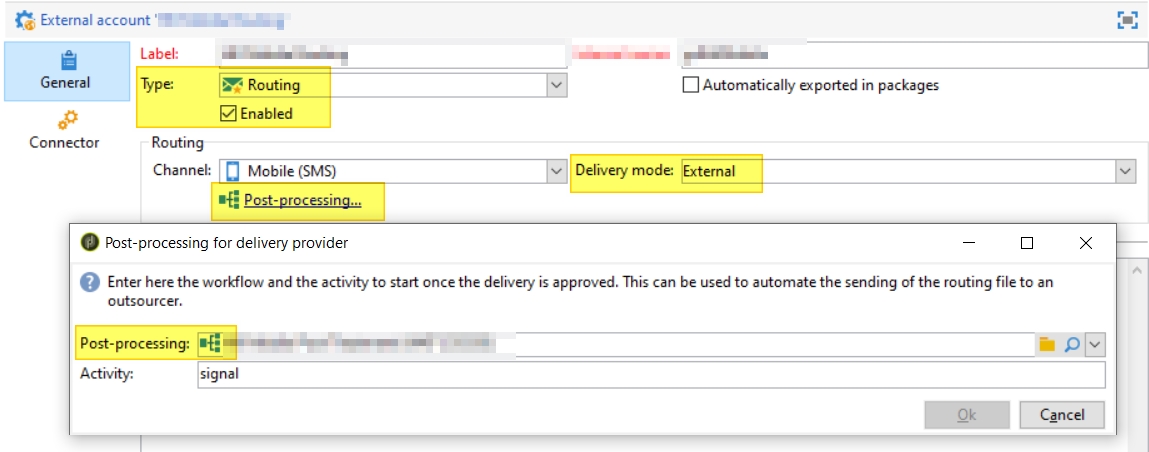
Create a new /Administration/Platform/External Account with:
- Name:
fcoAsyncRouting - Type:
Routing - Enabled:
Yes - Delivery Mode:
External - Post-Processing:
fcoAsyncPostProcessing
Delivery Template
Create a new Delivery with:
- General: Routing:
fcoAsyncPostProcessing - Analysis: Retrieval mode:
A result file determines sent and failed messages(upon delivery execution, broadlogs will have Status=Pending.
Validation & troubleshooting
- Check workflow logs for API call errors and retry logic
- Verify
HttpClientRequest.wait(requests)completes successfully before proceeding - Monitor the
onCompletefunction logs to confirm all records are processed - If requests hang, check the timeout value (default 2000ms) and increase if needed
- Ensure the external API endpoint is accessible from the Adobe Campaign server
Going further
- Tune the number of parallel requests (N in
sendNext) based on your API rate limits - Add retry logic with exponential backoff for failed API calls
- Implement error tracking in a custom table for audit purposes
- Consider using a Delivery template to standardize the External Delivery configuration
- Related: send these calls over SOAP with HTTP Post for SOAP calls, trace them live with Fiddler, or follow the full SOAP request/response flow