
Call another workflow upon completion to chain processes or coordinate multiple workflows in Adobe Campaign.
This approach uses PostEvent and signal activities to trigger workflows synchronously or asynchronously.
Preparation
Ensure both workflows are in the same instance and that the called workflow has a signal activity configured.
Walkthrough
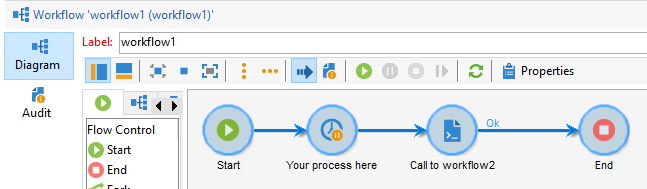
Generic case: workflow1 calls workflow2 with PostEvent
The calling workflow1 contains your business logic and ends with a javascript activity (containing NLWS.xtkWorkflow.PostEvent()):
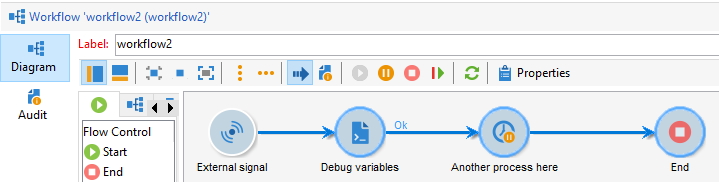
The called workflow2 has a signal activity and then some logic:
The generic JS call is as follow:
NLWS.xtkWorkflow.PostEvent(
  "workflowInternalName",
  "signalInternalName",
  "",
  new XML("<variables />"),
  false
);
So in our case:
var myVar1 = "hello world!";
NLWS.xtkWorkflow.PostEvent(
  "workflow2",
  "signal",
  "",
  new XML("<variables var1='" + myVar1 + "' />"),
  false
);
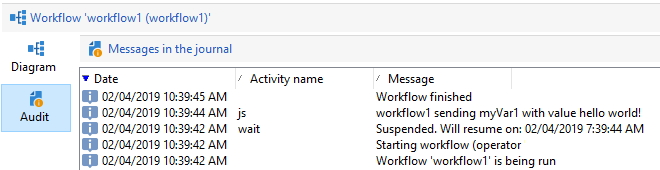
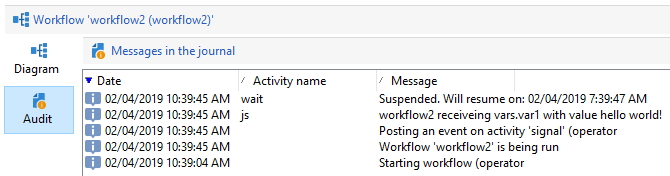
Start workflow2 (to activate its signal), then workflow1. We can see in the logs that the value has been passed over, in a synchronous call:
Logs of workflow1:
Logs of workflow2:
/**
 * @var workflowId Identifier or internal name of the workflow
 * @var activity The name of the activity from which the event starts
 * @var transition The name of the transition to activate. If this name is empty, the event will be issued on the first valid transition (expiry type events are ignored).
 * @var parameters The parameters of the event in the form of an XML element. The name of the element must be variables. If you do not want to pass a variable, you can use an empty element <variables/> or an empty string "".
 * @var complete All pending tasks of the specified activity are finished
 *
 * @return null
 */
function PostEvent (
    String       workflowId,
    String       activity,
    String       transition,
    XML          parameters,
    Boolean      complete
)
Validation & troubleshooting
Check the audit logs of both workflows to confirm the event was triggered and variables were passed correctly. If the called workflow does not start, verify that its signal activity is properly configured and the workflow is in a started state.
Going further
Wait for multiple workflows to complete
Use multiple signals with an AND activity to coordinate workflows. 3 workflows start1, start2 and start3 need to complete before the final workflow executes:
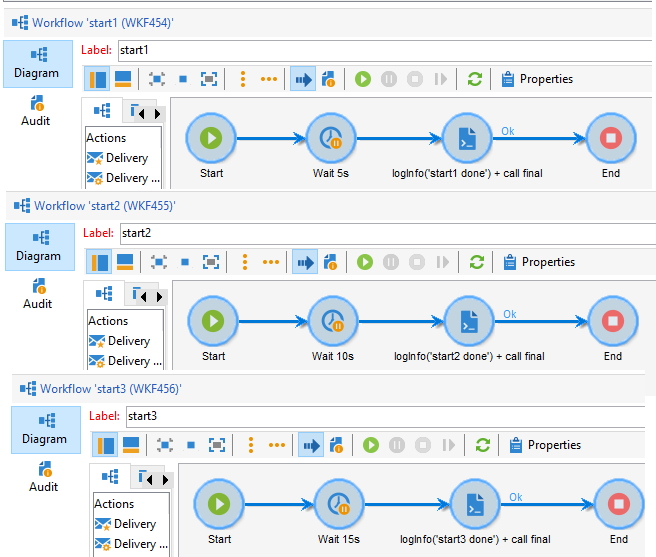
They contain this JS code:
// start1
logInfo("start1 done");
var params = new XML("<variables var1='hello' />");
NLWS.xtkWorkflow.PostEvent("finalWorkflow", "signal1", "", params, false);
// start2
logInfo("start2 done");
var myVar = "var myVar";
var params = new XML("<variables var2='" + myVar + "' />");
NLWS.xtkWorkflow.PostEvent("finalWorkflow", "signal2", "", params, false);
// start3
logInfo("start3 done");
var myObject = { key: "value" };
var params = new XML("<variables var3='" + myObject.key + "' />");
NLWS.xtkWorkflow.PostEvent("finalWorkflow", "signal3", "", params, false);
The final workflow contains 3 signals signal1, signal2 and signal3, all linked to an AND activity:
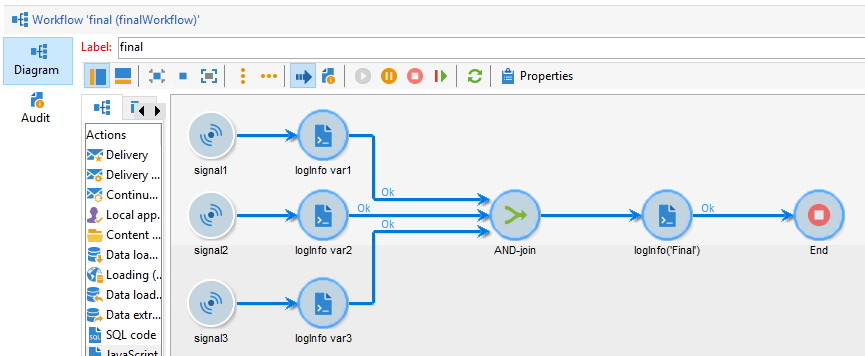
With this code:
logInfo("Final");
logInfo("vars.var1", vars.var1);
logInfo("vars.var2", vars.var2);
logInfo("vars.var3", vars.var3);
Run the final workflow first, then the 3 starting workflows. You’ll see the following logs:
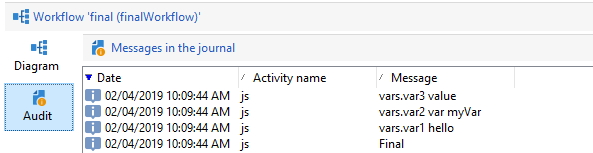
Exception handling
Simulate a try/catch/finally pattern:
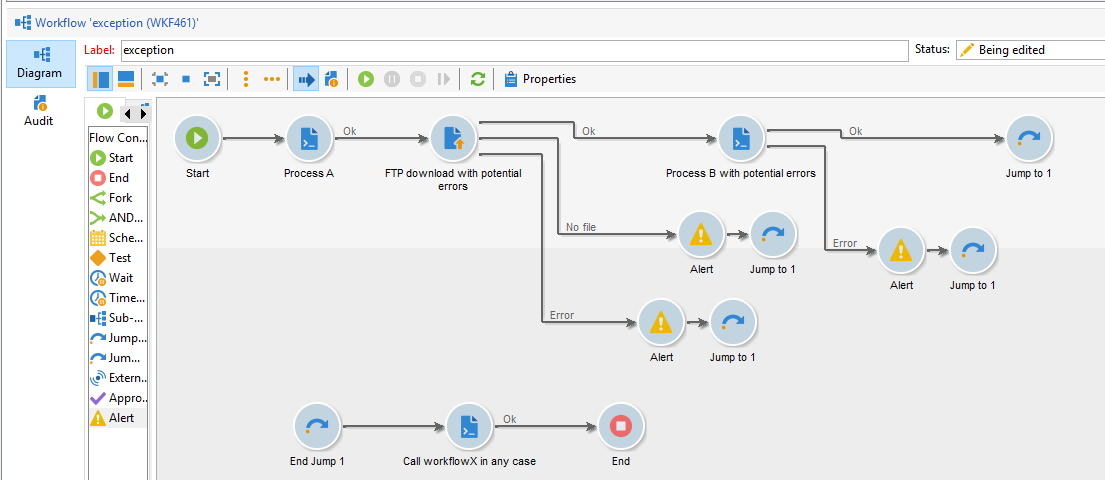
This is equivalent to the following pseudo-code:
processA(); // will stop the workflow if error
try {
  // @throw NoFileException, ConnectionException
  ftpDownload(); // will not stop the workflow
  // @throw GenericException
  processB(); // will not stop the workflow
} catch (exception) {
  alert();
} finally {
  CallToFinalWorkflow();
}
You may download the XML of this workflow with exception here