
Capture prospect referrals in an Adobe Campaign web form by creating a linked visitor record when a user refers a friend, ensuring traceability between referrer and referred contact.
Using Web Application with Storage and JavaScript post-processing, you can automatically create visitor records with foreign key relationships to the original recipient.
Preparation
Ensure you have access to Adobe Campaign with permissions to create Web Applications and modify the data schema. Gather requirements for the referral form fields including referrer information and friend details.
Walkthrough
The subscription form is hosted directly on Adobe Campaign as a Web Application (APP5). This web app creates Recipients (in US Recipients) and subscribes them to a Service (201904 My Event 1).
If a recipient A adds their friend B’s name, it will create a Visitor B with a link to the main Recipient A.
The event is named “201904 My Event 1” and can be used for anything: Product Launch, Sweepstakes, Store opening, Registering for a class, Sample Sales…

Web app content & Workflow
Create a web app with a web page, storage, javascript and end activities.
Page
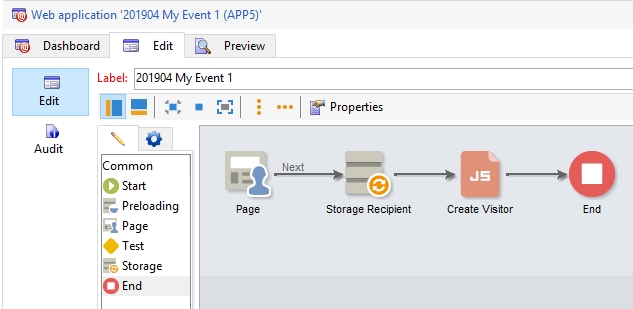
The web page code is as follow
(Please note that the 2 visitors fields are not mapped to any recipient field and use some customization with
onchange="document.controller.setValue('/ctx/visitor/fname', this.value)"):
<!doctype html>
<html lang="en">
  <head>
    <meta charset="utf-8" />
    <meta name="viewport" content="width=device-width, initial-scale=1, shrink-to-fit=no" />
    <title>Signin Template · Bootstrap</title>
    <link
      href="https://cdn.jsdelivr.net/npm/[email protected]/dist/css/bootstrap.min.css"
      rel="stylesheet"
    />
  </head>
  <body class="container py-5 text-center">
    <form class="card m-auto p-3 w-25" id="page-form" style="background: #e0e0e0;">
      <h1 class="h3 mb-3 font-weight-normal">Subscription form</h1>
      <div>
        <input
          class="form-control"
          type="text"
          placeholder="First Name*"
          data-nl-ismandatory="true"
          data-nl-xpath="@firstName"
          data-nl-label="First name"
          data-nl-bindto="xpath"
        />
      </div>
      <div>
        <input
          class="form-control"
          type="text"
          placeholder="Last Name*"
          data-nl-ismandatory="true"
          data-nl-xpath="@lastName"
          data-nl-label="Last name"
          data-nl-bindto="xpath"
        />
      </div>
      <div>
        <input
          class="form-control"
          type="text"
          placeholder="Email address*"
          data-nl-ismandatory="true"
          data-nl-xpath="@email"
          data-nl-label="Email"
          data-nl-bindto="xpath"
        />
      </div>
      <div>
        <input
          class="form-control"
          onchange="document.controller.setValue('/ctx/visitor/fname', this.value)"
          type="text"
          placeholder="Friend first name"
        />
      </div>
      <div>
        <input
          class="form-control"
          onchange="document.controller.setValue('/ctx/visitor/email', this.value)"
          type="text"
          placeholder="Friend email"
        />
      </div>
      <div class="form-check">
        <input
          class="form-check-input"
          type="checkbox"
          data-nl-ismandatory="true"
          data-nl-bindto="service"
          data-nl-servicelabel="201904 My Event 1"
          data-nl-servicename="usMyEvent1"
          data-nl-checkboxbehavior="subscription"
        /><label class="form-check-label"
          >I give my consent for further marketing communications*</label
        >
      </div>
      <div>
        <button
          class="btn btn-lg btn-primary btn-block"
          id="input15556888549606"
          type="submit"
          data-nl-bindto="action"
          data-nl-transition="next"
          data-nl-action="next"
        >
          OK
        </button>
      </div>
    </form>
  </body>
</html>
Through the editor, map the fields and use the checkbox as a Service Subscription:
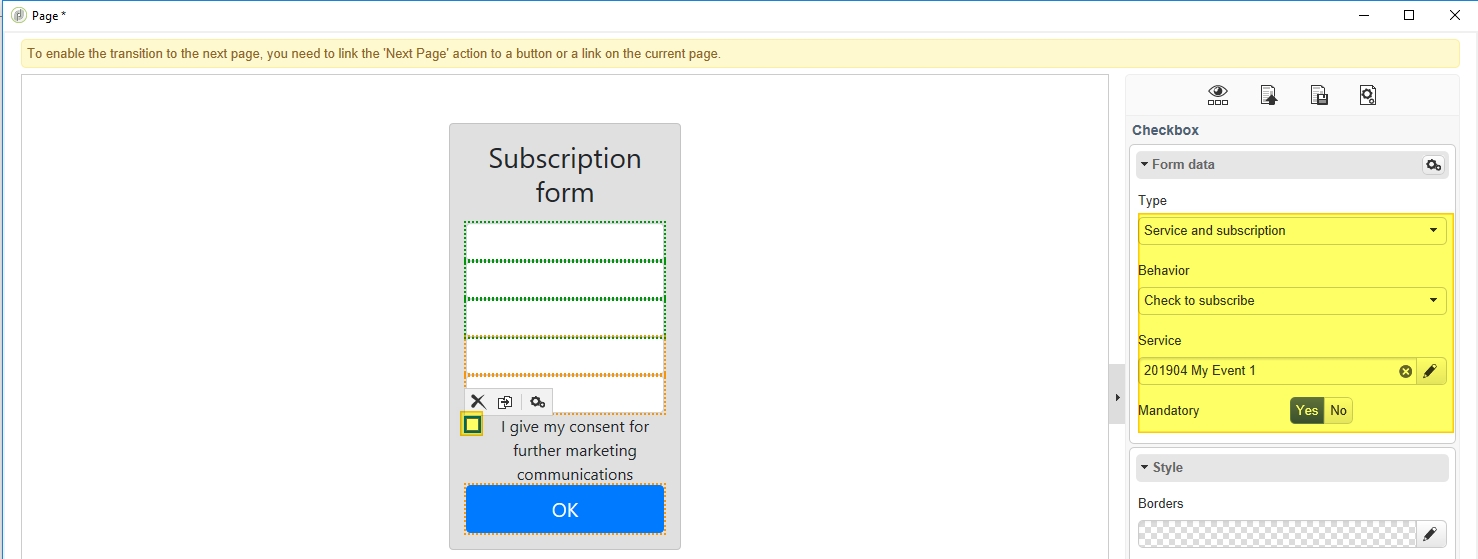
It results in:
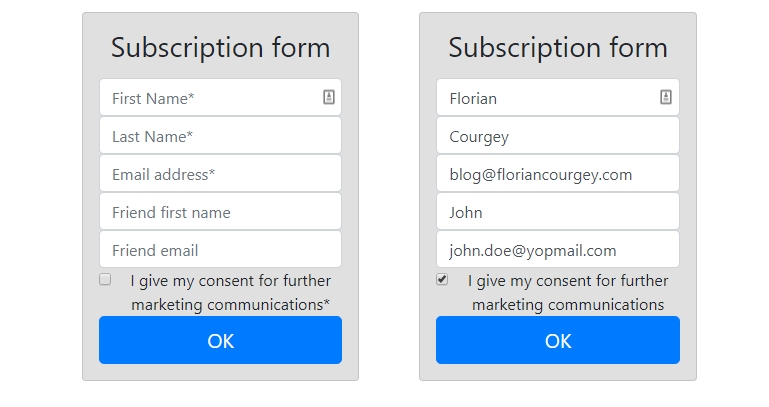
Storage
The Storage is set up with a reconciliation on the email field and creates recipients in the US Recipients folder.
Post-Processing Javascript
Creates a visitor if the “Friend’s name” field is not empty. It uses 2 foreign keys: referrerId and folder_id.
if(ctx.visitor && ctx.visitor.fname && ctx.visitor.fname.toString().length > 0){
  loadLibrary('crm:common.js'); // for getFolderId
  var visitor = NLWS.nmsVisitor.create();
  visitor.firstName = ctx.visitor.fname.toString();
  visitor.email = ctx.visitor.email.toString();
  visitor.referrerId = ctx.recipient.@id; // field @referredId
  var folderId = getFolderId('usMyEvent1'); // folder name to id conversion
  visitor.folder_id = folderId; // field @folder-id
  visitor.save();
}
Validation & troubleshooting
The visitor is created with a link to its referrer (Recipient). Verify the visitor record appears in the Adobe Campaign console with the correct referrerId foreign key populated.
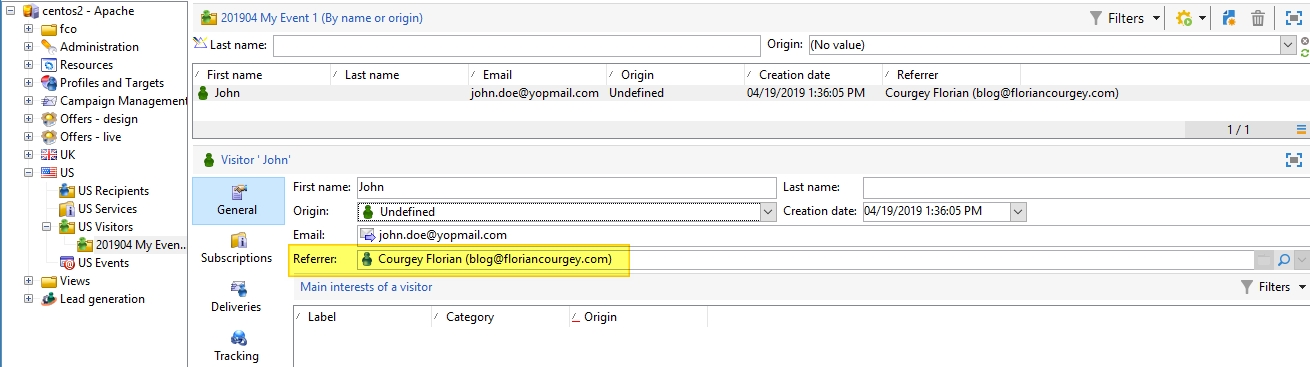
Going further
Extend this pattern to capture additional referral metadata, validate email formats before visitor creation, or implement duplicate detection to prevent multiple visitor records for the same friend email.