
Execute a workflow multiple times with changing parameters or iterate through a list of values by simulating a classic for loop using JavaScript and Test activities in Adobe Campaign.
This approach allows you to process items sequentially, maintaining state between iterations & having separate logs.
Preparation
Ensure you have a working Adobe Campaign instance with permissions to create workflows. Identify the list of values to iterate through and the processing logic for each iteration.
Walkthrough
V1 with Advanced Javascript Code
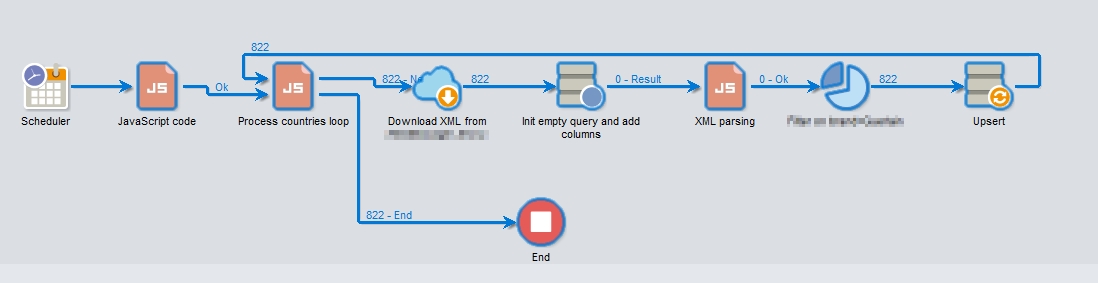
Init
instance.vars.counter = 0;
Advanced
var countries = ["UK", "EU", "IT", "NL"];
if (instance.vars.counter >= countries.length) {
  task.postEvent(task.transitionByName("end"));
  return 0;
}
instance.vars.pays = countries[instance.vars.counter];
instance.vars.counter++;
task.postEvent(task.transitionByName("next"));
Validation & troubleshooting
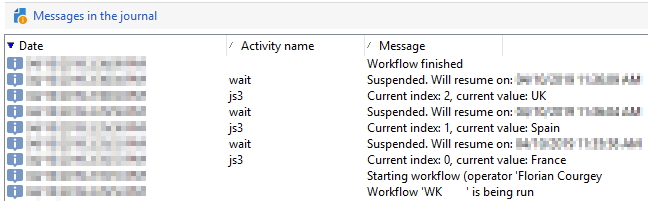
Verify the workflow executes the correct number of iterations by checking the logs. Each iteration should process the next value from the array.
Workflow 'WKF999' is being run
Workflow restarted (operator 'Myros')
js3	Current index: 0, current value: France
js3	Current index: 1, current value: Spain
js3	Current index: 2, current value: UK
Workflow finished
Going further
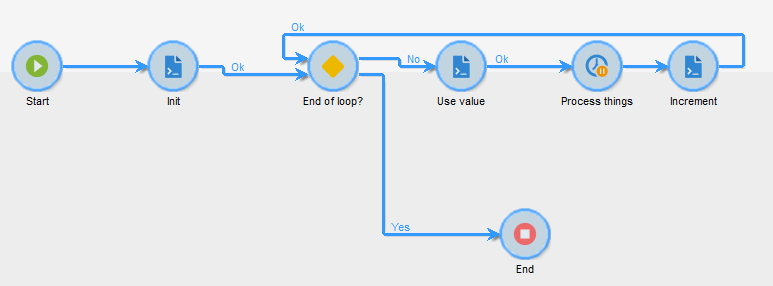
Create a first Javascript code with the array init and the serialization with JSON.stringify():
var javascriptArray = ["France", "Spain", "UK"];

vars.index = 0; // equivalent to "for(i=0"
vars.indexMax = javascriptArray.length; // compute the max index
vars.array = JSON.stringify(javascriptArray); // serialize the array as a string, per Adobe Campaign "vars" constraints
Test activity
The Test activity is then setup as follows (equivalent):
  - Label: End of loop?
  - Conditions
    - Label Yes: vars.index >= vars.indexMax
  - Default branching
    - Use Default connection: No
Process
In the loop, you can use the array anytime with JSON.parse():
var current = JSON.parse(vars.array)[vars.index];
logInfo("Current index: " + vars.index + ", current value: " + current);
End of loop
At the end of the loop, a simple vars.index++; gets the job done!